<?xml version="1.0" encoding="utf-8"?><feed xmlns="http://www.w3.org/2005/Atom" xml:lang="en_US"><generator uri="https://jekyllrb.com/" version="3.10.0">Jekyll</generator><link href="https://inspirho.com/feed.xml" rel="self" type="application/atom+xml" /><link href="https://inspirho.com/" rel="alternate" type="text/html" hreflang="en_US" /><updated>2026-10-30T08:21:41+00:00</updated><id>https://inspirho.com/feed.xml</id><title type="html">ins · Π · rho</title><subtitle>inspired by life et al.</subtitle><author><name>Harsha Reddy</name></author><entry><title type="html">With just one polka dot, nothing can be achieved</title><link href="https://inspirho.com/cg/with-just-one-polka-dot-nothing-can-be-achieved/" rel="alternate" type="text/html" title="With just one polka dot, nothing can be achieved" /><published>2022-12-05T10:01:09+00:00</published><updated>2022-12-05T10:01:09+00:00</updated><id>https://inspirho.com/cg/with-just-one-polka-dot-nothing-can-be-achieved</id><content type="html" xml:base="https://inspirho.com/cg/with-just-one-polka-dot-nothing-can-be-achieved/"><![CDATA[<p class="has-medium-font-size">[<em>This is a work in progress, some interactives might not work</em>]</p>


<script type="importmap">
  {
    "imports": {
      "three": "/assets/vendor/three/three.module.js",
      "three/addons/": "/assets/vendor/three/addons/"
    }
  }
</script>

<script type="module">
  import * as THREE from "three";

  if(typeof ThreeRender !== "function")
  {
    window.ThreeRender = class {
      constructor(elementId) {
        this.canvas = document.getElementById(elementId);
        this.canvas.style.height = this.canvas.style.width;
        this.canvas.width  = this.canvas.offsetWidth;
        this.canvas.height = this.canvas.offsetWidth;
      }

      animate() {
          requestAnimationFrame(()=>this.animate());
          this.manipulate();
          this.renderer.render(this.scene, this.camera);
      }

      manipulate() {
        this.mesh.rotation.x += 0.0002;
        this.mesh.rotation.y += 0.0002;
        this.mesh.rotation.z += 0.0002;
      }

      setup() {
        this.camera = new THREE.OrthographicCamera( -400, 400, 400, -400, 1, 1000 );
        this.camera.position.z = 400;
        this.camera.lookAt(new THREE.Vector3(0,0,0));
        this.scene.add(this.camera);

        var geometry = new THREE.SphereGeometry(300);
        var material = new THREE.LineBasicMaterial( {color: 0x666666} );

        this.mesh = new THREE.LineSegments( geometry, material );
        this.scene.add( this.mesh );
      }

      render() {
        this.scene = new THREE.Scene();
        this.renderer = new THREE.WebGLRenderer( { canvas: this.canvas, antialias: true, alpha: true, stencil: true} );
        this.renderer.setClearColor( 0x000000, 0 );
        this.setup();
        this.animate();
      }

    };
  }
</script>


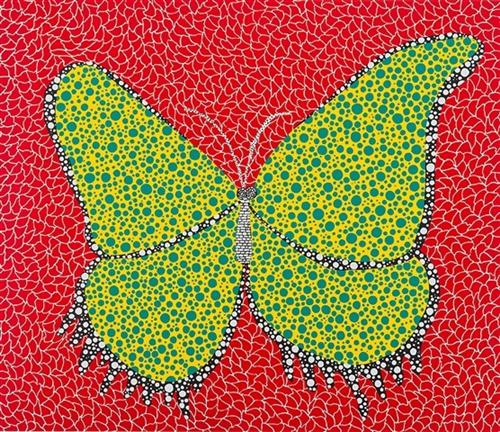
<figure class="wp-block-image size-full"><img decoding="async" loading="lazy" width="500" height="432" src="/wp-content/uploads/2022/12/butterfly-1988.jpgBlog.jpg" alt="" class="wp-image-709" srcset="/wp-content/uploads/2022/12/butterfly-1988.jpgBlog.jpg 500w, /wp-content/uploads/2022/12/butterfly-1988.jpgBlog-300x259.jpg 300w" sizes="(max-width: 500px) 85vw, 500px" /><figcaption class="wp-element-caption">Butterfly, <a href="https://www.wikiart.org/en/yayoi-kusama"><em>Yayoi Kusama</em></a>&nbsp;1988<br></figcaption></figure>


<h2><em>Prologue</em></h2>


<p>It is a widely known scientific fact that a <a rel="noreferrer noopener" href="https://en.wikipedia.org/wiki/Spherical_cow" target="_blank">cow is a sphere</a>. Further, one might trivially observe that, a sphere is a point. Hence, points are the infimum of world models, earning their canonical reverence by representing any object and describing any phenomenon. So, we have much incentive in studying points and the arrangements of points.</p>


<h2><em>Part 0<br></em>The Point</h2>


<div class="wp-block-image">
<figure class="aligncenter size-full"><img decoding="async" loading="lazy" width="556" height="142" src="/wp-content/uploads/2022/12/TesseractExplanation.gif" alt="Evolution of a point" class="wp-image-831"/></figure></div>


<p></p>


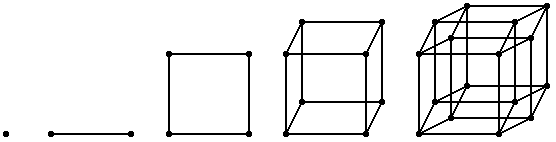
<p>The point is the only geometry in the lowest dimension. The complication of dimensions allows us to make lines, squares, cubes, tesseracts, and so on. But since each of those objects can be discretized into the simpler forms – cubes made of squares, square of lines, and ultimately lines made of points, we can see that points truly can be thought of as building blocks of everything.</p>


<p>Kusama was right on money when she said <em>&#8220;With just one polka dot, nothing can be achieved&#8221;</em>. Points are interesting when they play with each other. In this post, I want to explore how points come together to create a complex myriad of patterns and phenomenon that we see in the world.</p>


<h2><em>Part I<br></em>Entropy</h2>


<p>Let&#8217;s begin where the worlds end – the state of highest entropy or pure randomness! What does it look like to randomly sample points from a <a rel="noreferrer noopener" href="https://en.wikipedia.org/wiki/Continuous_uniform_distribution" target="_blank">Uniform Distribution Function</a> for our dots?</p>


<canvas id="dots_rand" style="background: transparent; width: 100%; height: 1px; display: block;"></canvas><br>
<table class="l1 wp-block-table aligncenter" style="border: none;">
<tbody>
<tr>
<td><input type="range" min="0" max="50" value="25" class="slider" id="rand_slider"></td>
<td>Number of Points</td>
</tr>
</tbody>
</table>
<input class="aligncenter" onclick="(function() {
  document.getElementById('rand_slider').value = document.getElementById('rand_slider').defaultValue;
  window.randReset = true;
})()" type="reset" value="Reset">


<script type="module">
import * as THREE from 'three';
var myCanvasRenderer = new ThreeRender('dots_rand');

myCanvasRenderer.setup = function() {

  this.camera = new THREE.PerspectiveCamera(60, 1, 1, 1000);
  this.camera.position.z = 200;
  this.camera.up = new THREE.Vector3(0,0,1);
  this.camera.lookAt(new THREE.Vector3(0,0,0));
  this.scene.add(this.camera);
  

  const bgSize = 200;
  this.grid = new THREE.Mesh(new THREE.BoxGeometry(bgSize, bgSize, .1),
                             new THREE.MeshBasicMaterial({depthTest:false, color: 0xD83A33}));
  this.grid.matrixAutoUpdate=false;
  this.scene.add(this.grid);


  var dotGeometry = new THREE.BufferGeometry();
  this.pointSize = 32;
  this.wid = (bgSize-(bgSize/10)) - (this.pointSize/2);
  this.prevRandSlider = document.getElementById("rand_slider").value;
  const vertices = [];
  for (let i = 0; i < document.getElementById("rand_slider").max; i ++)
  {
    const x = this.wid * Math.random() - (this.wid/2);
    const y = this.wid * Math.random() - (this.wid/2);
    vertices.push(x, y, 0.);
  }
  const sprite = new THREE.TextureLoader().load('/wp-content/uploads/2022/12/shadow.png');
  dotGeometry.setAttribute('position', new THREE.Float32BufferAttribute(vertices, 3));
  var dotMaterial = new THREE.PointsMaterial({ size: this.pointSize, map: sprite, alphaTest: 0.5, transparent: true });
  this.dot = new THREE.Points(dotGeometry, dotMaterial);
  this.dot.geometry.setDrawRange(0, this.prevRandSlider);
  this.scene.add(this.dot);

};

myCanvasRenderer.manipulate = function() {
  if(document.getElementById("rand_slider").value != this.prevRandSlider)
  {
    this.prevRandSlider = document.getElementById("rand_slider").value;

    if(window.randReset)
    {
      window.randReset = false;

      const vertices = this.dot.geometry.attributes.position.array;
      for (let i = 0; i < this.prevRandSlider; i ++)
      {
        vertices[i*3 + 0] = this.wid * Math.random() - (this.wid/2);
        vertices[i*3 + 1] = this.wid * Math.random() - (this.wid/2);
      }
      
    }

    this.dot.geometry.setDrawRange(0, this.prevRandSlider);
    this.dot.geometry.attributes.position.needsUpdate = true;
  }
}

function reset_rand() {
  document.getElementById("rand_slider").value = document.getElementById("rand_slider").defaultValue;
  window.randReset = true;
}

myCanvasRenderer.render();

</script>


<p>One might think <em>"What's in a randomly scattered set of points?"</em> – Quite a bit actually! For instance, Monte Carlo method to Calculate π</p>


<p>[Todo Demo] Finding ~pi.</p>


<h2><em>Part II<br></em>Patterns</h2>


<canvas id="dots_uniform" style="background: transparent; width: 100%; height: 1px; display: block;"></canvas><br>
<table class="l1 wp-block-table aligncenter" style="border: none;">
<tbody>
<tr>
<td><input type="range" min="0" max="1" value="0" class="slider" id="pattern_slider"></td>
</tr>
</tbody>
</table>


<script type="module">
import * as THREE from 'three';
var myCanvasRenderer = new ThreeRender('dots_uniform');

myCanvasRenderer.setup = function() {

  this.camera = new THREE.PerspectiveCamera(60, 1, 1, 1000);
  this.camera.position.z = 200;
  this.camera.up = new THREE.Vector3(0,0,1);
  this.camera.lookAt(new THREE.Vector3(0,0,0));
  this.scene.add(this.camera);
  

  const bgSize = 200;
  this.grid = new THREE.Mesh(new THREE.BoxGeometry(bgSize, bgSize, .1),
                             new THREE.MeshBasicMaterial({depthTest:false, color: 0xD83A33}));
  this.grid.matrixAutoUpdate=false;
  this.scene.add(this.grid);


  var dotGeometry = new THREE.BufferGeometry();
  this.pointSize = 32;
  this.gap = 26.5;
  this.wid = (bgSize-(bgSize/10)) - (this.pointSize/2);
  this.prevSlider = 0;
  var vertices = [];
  for (let i = 0; i < 7; i ++)
  {
    for (let j = 0; j < 7; j ++)
    {
      const x = (i-3) * this.gap;
      const y = (j-3) * this.gap;
      vertices.push(x, y, 0.);
    }
  }
  const sprite = new THREE.TextureLoader().load('/wp-content/uploads/2022/12/shadow.png');
  dotGeometry.setAttribute('position', new THREE.Float32BufferAttribute(vertices, 3));
  var dotMaterial = new THREE.PointsMaterial({ size: this.pointSize, map: sprite, alphaTest: 0.5, transparent: true });
  this.dot = new THREE.Points(dotGeometry, dotMaterial);
  this.scene.add(this.dot);

};

myCanvasRenderer.manipulate = function() {
  if(document.getElementById("pattern_slider").value != this.prevSlider)
  {
    this.prevSlider = document.getElementById("pattern_slider").value;

    var vertices = this.dot.geometry.attributes.position.array;
    var index = 0
    for (let i = 0; i < 7; i ++)
    {
      const num = this.prevSlider==1 ? ((i%2) ? 6 : 7) : 7;
      for (let j = 0; j < num; j ++)
      {
        vertices[index++] = (i-3) * this.gap;
        vertices[index++] = ((j-3) * this.gap) + (this.prevSlider==1 ? ((i%2)*this.gap/2) : 0);
        vertices[index++] = 0.;
      }
    }

    this.dot.geometry.setDrawRange(0, this.prevSlider==1 ? 46 : 49);
    this.dot.geometry.attributes.position.needsUpdate = true;
  }
}

myCanvasRenderer.render();

</script>


<p>Wes Anderson-esque patterns such as these are pleasing to look at. But they are not always useful, especially when we are modelling something more natural like trees on the forest floor, placing fur on characters etc.</p>


<p>Let's now try to hit a soft spot between the extremes of disorderliness and orderliness. One such way is Poisson Disk Sampling that I will demonstrate below.</p>


<h2><em>Part III<br></em>Structured Noise</h2>


<p>One of the simplest structed random distributions is <em>Jittered Grid</em>. In this method, we divide our space into $n\times n$ grid and choose a random point in each grid block. </p>


<canvas id="dots_jittered_grid" style="background: transparent; width: 100%; height: 1px; display: block;"></canvas><br>
<table class="l1 wp-block-table aligncenter" style="border: none;">
<tbody style=>
<tr>
<td><input type="range" min="0" max="10" value="5" class="slider" id="jgs_slider" style="text-align: center"></td>
<td>Grid Size</td>
</tr>
<tr>
<td><input type="range" min="0" max="1" step="0.01" value="0.5" class="slider" id="jgj_slider" style="text-align: center"></div></td>
<td>Jitter Strength</td>
</tr>
</tbody>
</table>


<script type="module">
import * as THREE from 'three';
var myCanvasRenderer = new ThreeRender('dots_jittered_grid');

myCanvasRenderer.setup = function() {

  this.camera = new THREE.PerspectiveCamera(60, 1, 1, 1000);
  this.camera.position.z = 200;
  this.camera.up = new THREE.Vector3(0,0,1);
  this.camera.lookAt(new THREE.Vector3(0,0,0));
  this.scene.add(this.camera);
  this.slider = document.getElementById("jgs_slider");
  this.jitter = document.getElementById("jgj_slider");
  

  const bgSize = 200;
  this.grid = new THREE.Mesh(new THREE.BoxGeometry(bgSize, bgSize, .1),
                             new THREE.MeshBasicMaterial({depthTest:false, color: 0xD83A33}));
  this.grid.matrixAutoUpdate=false;
  this.scene.add(this.grid);

  var dotGeometry = new THREE.BufferGeometry();
  this.pointSize = 200/this.slider.value;
  this.wid = bgSize;
  this.gap = this.wid/this.slider.value;
  this.prevSlider = 0;
  this.prevJitter = 0;
  var vertices = [];
  const maxSize = 40;
  for (let i = 0; i < maxSize; i ++)
  {
    for (let j = 0; j < maxSize; j ++)
    {
      const x = (i-(this.slider.value*1.-1.)/2) * this.gap;
      const y = (j-(this.slider.value*1.-1.)/2) * this.gap;
      vertices.push(x, y, 0.);
    }
  }
  const sprite = new THREE.TextureLoader().load('/wp-content/uploads/2022/12/shadow.png');
  dotGeometry.setAttribute('position', new THREE.Float32BufferAttribute(vertices, 3));
  var dotMaterial = new THREE.PointsMaterial({ size: this.pointSize, map: sprite, alphaTest: 0.5, transparent: true });
  this.dot = new THREE.Points(dotGeometry, dotMaterial);
  this.scene.add(this.dot);

};

myCanvasRenderer.manipulate = function() {
  if (this.slider.value != this.prevSlider || this.jitter.value != this.prevJitter)
  {
    this.prevSlider = this.slider.value;
    this.prevJitter = this.jitter.value;

    const newPointSize = 200/this.slider.value;

    this.gap = this.wid/this.slider.value;

    const jitterScaled = this.jitter.value*this.gap;

    var vertices = this.dot.geometry.attributes.position.array;
    var index = 0
    for (let i = 0; i < this.slider.value; i++)
    {
      for (let j = 0; j < this.slider.value; j++)
      {
        vertices[index++] = (i-(this.slider.value*1.-1.)/2) * this.gap + jitterScaled * Math.random() - jitterScaled/2;
        vertices[index++] = (j-(this.slider.value*1.-1.)/2) * this.gap + jitterScaled * Math.random() - jitterScaled/2;
        vertices[index++] = 0.;
      }
    }

    this.dot.geometry.setDrawRange(0, this.prevSlider*this.prevSlider);
    this.dot.geometry.attributes.position.needsUpdate = true;
    this.dot.material.size = newPointSize;
    this.dot.material.needsUpdate = true;
  }
}

myCanvasRenderer.render();

</script>


<p>While this method is a step towards less regularity, we still see grid layout in low jitter values. On the other had, for higher jitter values, there are significant number of point too close to each other. There is no way to guarantee a good spaced out distribution with this approach. Fret not, because we have other tricks up our sleeve to fix these issues and get a better result.</p>


<p>Let's now look at Blue Noise, an even, isotropic, yet unstructured distribution of points using <em>Poisson Disk Sampling</em>. We will later see how minor variations of this allows us to make the night sky, or even make our own dithering engine.</p>


<p>But for now, here's a $O(n)$ implementation of the paper <a href="https://www.cs.ubc.ca/~rbridson/docs/bridson-siggraph07-poissondisk.pdf">Fast Poisson Disk Sampling in Arbitrary Dimensions</a> by Prof. Robert Bridson of <em>University of British Columbia</em>.</p>]]></content><author><name>Harsha Reddy</name></author><category term="cg" /><summary type="html"><![CDATA[Exploring the dance of dots.]]></summary></entry><entry><title type="html">An ode to Affine Transformations</title><link href="https://inspirho.com/cg/ill-have-one-slice-of-4d-thank-you/" rel="alternate" type="text/html" title="An ode to Affine Transformations" /><published>2022-01-04T08:06:28+00:00</published><updated>2022-01-04T08:06:28+00:00</updated><id>https://inspirho.com/cg/ill-have-one-slice-of-4d-thank-you</id><content type="html" xml:base="https://inspirho.com/cg/ill-have-one-slice-of-4d-thank-you/"><![CDATA[<script type="importmap">
  {
    "imports": {
      "three": "/assets/vendor/three/three.module.js",
      "three/addons/": "/assets/vendor/three/addons/"
    }
  }
</script>

<script type="module">
  import * as THREE from "three";

  if(typeof ThreeRender !== "function")
  {
    window.ThreeRender = class {
      constructor(elementId) {
        this.canvas = document.getElementById(elementId);
        this.canvas.style.height = this.canvas.style.width;
        this.canvas.width  = this.canvas.offsetWidth;
        this.canvas.height = this.canvas.offsetWidth;
      }

      animate() {
          requestAnimationFrame(()=>this.animate());
          this.manipulate();
          this.renderer.render(this.scene, this.camera);
      }

      manipulate() {
        this.mesh.rotation.x += 0.0002;
        this.mesh.rotation.y += 0.0002;
        this.mesh.rotation.z += 0.0002;
      }

      setup() {
        this.camera = new THREE.OrthographicCamera( -400, 400, 400, -400, 1, 1000 );
        this.camera.position.z = 400;
        this.camera.lookAt(new THREE.Vector3(0,0,0));
        this.scene.add(this.camera);

        var geometry = new THREE.SphereGeometry(300);
        var material = new THREE.LineBasicMaterial( {color: 0x666666} );

        this.mesh = new THREE.LineSegments( geometry, material );
        this.scene.add( this.mesh );
      }

      render() {
        this.scene = new THREE.Scene();
        this.renderer = new THREE.WebGLRenderer( { canvas: this.canvas, antialias: true, alpha: true, stencil: true} );
        this.renderer.setClearColor( 0x000000, 0 );
        this.setup();
        this.animate();
      }

    };
  }
</script>


<h2><em>Prologue</em><br></h2>


<p class="has-drop-cap">Almost every render you see today, be it in a game, in a movie, or your favourite graphics application, you are witnessing the result of a really cool technique that takes those 3D objects, &#8220;expands&#8221; it into a 4D realm, twists and turns the objects in the fourth dimension, and ultimately extracts a slice of it, all so that you can witness your friend vroom past you in Mario Kart™ in full 3D glory. Wut? Why do we have to enter this realm of 4 dimensions you ask? You have come to the right place, my friend, where we talk about matrices, <a href="#4d_second">what they can do for us</a>, <a href="#4d_third">what they cannot</a> (<em>jump here if you have witnessed the glory of matrices already</em>), and <a href="#4d_fourth">how we overcome</a> their limitation.</p>


<p>Let us take a look at this tiny and abundantly common example:</p>


<canvas id="4d_first" style="background: transparent; width: 100%; height: 1px; display: block;"></canvas><br>


<script type="module">
import * as THREE from 'three';
var myCanvasRenderer = new window.ThreeRender('4d_first');

myCanvasRenderer.setup = function() {
  this.camera = new THREE.PerspectiveCamera( 60, 1, 1, 1000 );
  this.camera.position.z = 200;
  // this.camera.position.y = -200;
  // this.camera.position.x = 100;
  this.camera.up = new THREE.Vector3(0,0,1);
  this.camera.lookAt(new THREE.Vector3(0,0,0));
  this.scene.add(this.camera);
  
  var geometry = new THREE.BoxGeometry( 100, 100, 0.01 );
  var material = new THREE.MeshBasicMaterial( {depthTest:false, color: 0xff6666} );
  this.plane = new THREE.Mesh( geometry, material );
  this.plane.matrixAutoUpdate=false;
  this.scene.add(this.plane);

  this.grid = new THREE.Mesh(new THREE.BoxGeometry(200, 200, .1),
                             new THREE.MeshBasicMaterial({depthTest:false, color: 0x666666, opacity: 0.3, transparent:true})
                            );
  this.grid.matrixAutoUpdate=false;
  this.scene.add(this.grid);
};

myCanvasRenderer.manipulate = function() {
  var theta = 0.002;
  var mat = new THREE.Matrix4().set(
       Math.cos(theta), -Math.sin(theta), 0, 0,
       Math.sin(theta), Math.cos(theta), 0, 0,
       0, 0, 1, 0,
       0, 0, 0, 1);
  this.plane.applyMatrix4(mat);
}

myCanvasRenderer.render();
</script>


<p>Let&#8217;s consider the four corner points of this mesh. Say, they are at points $(x, y)$. To create an animation as shown above, we need move the points around the origin, $(0, 0)$. Say we are required to move by an angle $\theta$ every frame. Using a tad bit of trigonometry and jumping onto the complex plane, if the current point $(x, y)$ be written as $k\cdot e^{i\alpha}$, we have the new point $(x&#8217;, y&#8217;)$ which is rotated by $\theta$ radians as:<br>$$\begin{eqnarray}<br>k \cdot e^{i \beta} &amp;=&amp; k\cdot e^{i(\alpha + \theta)} \\<br>&amp;=&amp; k\cdot e^{i\alpha} \cdot e^{i\theta} \\<br>&amp;=&amp; k \cdot (\cos \alpha + i\sin \alpha) \cdot \\<br>&amp; &amp; (\cos \theta + i\sin \theta) \\<br>&amp;=&amp; (x + iy) \cdot (\cos \theta + i\sin \theta) \\<br>x&#8217;+iy&#8217;&amp;=&amp; (x \cos \theta &#8211; y \sin \theta) +\\<br>&amp; &amp; i(y \cos \theta + x \sin \theta)<br>\end{eqnarray}$$<br>Dissociating the real and complex parts:<br>$$\begin{eqnarray}<br>x&#8217; &amp;=&amp; x \cos \theta &amp;-&amp; y \sin \theta \\<br>y&#8217; &amp;=&amp; x \sin \theta &amp;+&amp; y \cos \theta<br>\end{eqnarray}$$<br>So we can place the points in their new coordinates every frame according to our equation here and we would end up with an animation shown above, where the points would be rotating about the origin by $\theta$ every frame.</p>


<p>Another way of writing the same equation is:<br>$$<br>\begin{bmatrix}<br>x&#8217;\\<br>y&#8217;<br>\end{bmatrix}<br>=<br>\begin{bmatrix}<br>\cos \theta &amp; -\sin \theta\\<br>\sin \theta &amp; \cos \theta<br>\end{bmatrix}<br>\cdot<br>\begin{bmatrix}<br>x\\<br>y<br>\end{bmatrix}<br>$$ If we multiply the matrices on the right hand side of this equation, we see that it&#8217;s the same old wine, just in a new bottle:<br>$$<br>\begin{bmatrix}<br>x&#8217;\\<br>y&#8217;<br>\end{bmatrix}<br>=<br>\begin{bmatrix}<br>x \cos \theta &amp;-&amp; y \sin \theta\\<br>x \sin \theta &amp;+&amp; y \cos \theta<br>\end{bmatrix}<br>$$<br></p>


<h2><em>Part I<br></em>Rise of the Planet of the Matrices</h2>


<p>Then, why would we bother writing a perfectly fine equation as a matrix multiplication? While matrices are not mathemagic, they definitely are a convenience. Please, allow me to demonstrate.</p>


<p>Say our new task is to both rotate and scale a square like this:</p>


<canvas id="4d_second" style="background: transparent; width: 100%; height: 1px; display: block;"></canvas><br>


<script type="module">
import * as THREE from 'three';
var myCanvasRenderer = new window.ThreeRender('4d_second');

myCanvasRenderer.setup = function() {
  this.camera = new THREE.PerspectiveCamera( 60, 1, 1, 1000 );
  this.camera.position.z = 200;
  // this.camera.position.y = -200;
  // this.camera.position.x = 100;
  this.camera.up = new THREE.Vector3(0,0,1);
  this.camera.lookAt(new THREE.Vector3(0,0,0));
  this.scene.add(this.camera);
  
  var geometry = new THREE.BoxGeometry( 100, 100, 0.01 );
  var material = new THREE.MeshBasicMaterial( {depthTest:false, color: 0xff6666} );
  this.plane = new THREE.Mesh( geometry, material );
  this.plane.matrixAutoUpdate=false;
  this.scene.add(this.plane);

  this.grid = new THREE.Mesh(new THREE.BoxGeometry(200, 200, .1),
                             new THREE.MeshBasicMaterial({depthTest:false, color: 0x666666, opacity: 0.3, transparent:true})
                            );
  this.grid.matrixAutoUpdate=false;
  this.scene.add(this.grid);

};

myCanvasRenderer.manipulate = function() {
  if(this.plane.scale.y>1.3) this.flip = true;
  else if(this.plane.scale.y<0.7) this.flip = false;
  var theta = this.flip ? -0.002 : 0.002;
  var s = this.flip ? 0.999 : 1.001;
  var mat = new THREE.Matrix4().set(
       s*Math.cos(theta), -Math.sin(theta), 0, 0,
       Math.sin(theta), s*Math.cos(theta), 0, 0,
       0, 0, 1, 0,
       0, 0, 0, 1);
  this.plane.applyMatrix4(mat);
}

myCanvasRenderer.render();
</script>


<p class="has-very-light-gray-background-color has-background">Scaling matrix can be created similar to how the rotation matrix was created above. We can trivially observe the following equation to be true:<br>$$<br>\begin{bmatrix}<br>x'\\<br>y'<br>\end{bmatrix}<br>=<br>\begin{bmatrix}<br>s_x &amp; 0\\<br>0 &amp; s_y<br>\end{bmatrix}<br>\cdot<br>\begin{bmatrix}<br>x\\<br>y<br>\end{bmatrix}<br>\\<br>=<br>\begin{bmatrix}<br>s_x\cdot x\\<br>s_y\cdot y<br>\end{bmatrix}<br>$$ where $s_x$ and $s_y$ are $x$ scaling and $y$ scaling factors respectively.</p>


<p>To achieve multiple transformations (rotation and scaling as seen above), we can take a shortcut; instead of applying rotation matrix first and then applying the scaling matrix, we can just multiply corresponding matrices together like so and apply it once on the points:<br>$$<br>\begin{bmatrix}<br>s_x &amp; 0\\<br>0 &amp; s_y<br>\end{bmatrix} \cdot<br>\begin{bmatrix}<br>\cos \theta &amp; -\sin \theta\\<br>\sin \theta &amp; \cos \theta<br>\end{bmatrix}$$ How cool is that?! You can chain as many transformations as you please. Imagine the possibilities! If you have a thousand points and a hundred transformations that you want to apply these transformations to; you could apply hundred transformations on each point, resulting in 100*1000 matrix multiplications, or, you can "collapse" transformations into one matrix, by multiplying the hundred matrices together, and finally multiply this matrix with the thousand points. To put things in perspective, this shortcut solves such a problem in 10 minutes, as opposed to taking more than 24 hours using the older method (assuming a second per matrix multiplication). There are a bunch of other nice things about matrices making them our ultimate choice for a variety of tasks, ranging from computer graphics to machine learning.</p>


<p>Okay, so matrices do have a few tricks up their sleeves. Can we use matrices for any transformation? The answer is, no. But before we go there, let's get a feel for what a 2D matrix allows us to do. Below is a demo with a $2 \times 2$ matrix represented as sliders:</p>


<canvas id="4d_third" style="background: transparent; width: 100%; height: 1px; display: block;"></canvas><br>
<table class="l1 wp-block-table aligncenter" style="border: none;">
<tbody>
  <tr><td>
<input type="range" min="0" max="200" value="100" class="slider" id="third_11">
</td>
<td><input type="range" min="-100" max="100" value="0" class="slider" id="third_12"></td></tr>
  <tr><td><input type="range" min="-100" max="100" value="0" class="slider" id="third_21"></td>
<td><input type="range" min="0" max="200" value="100" class="slider" id="third_22"></td></tr>
</tbody>
</table>
<input class="aligncenter" onclick="(function ()
{
document.getElementById('third_11').value=100;
document.getElementById('third_12').value=0;
document.getElementById('third_21').value=0;
document.getElementById('third_22').value=100;
})();" type="reset" value="Reset">


<script type="module">
import * as THREE from 'three';
var myCanvasRenderer = new window.ThreeRender('4d_third');

myCanvasRenderer.setup = function() {
  this.camera = new THREE.PerspectiveCamera( 60, 1, 1, 1000 );
  this.camera.position.z = 200;
  // this.camera.position.y = -200;
  // this.camera.position.x = 100;
  this.camera.up = new THREE.Vector3(0,0,1);
  this.camera.lookAt(new THREE.Vector3(0,0,0));
  this.scene.add(this.camera);
  
  var geometry = new THREE.BoxGeometry( 100, 100, 0.01 );
  var material = new THREE.MeshBasicMaterial( {depthTest:false, color: 0xff6666} );
  this.plane = new THREE.Mesh( geometry, material );
  this.plane.matrixAutoUpdate=false;
  this.scene.add(this.plane);

  this.grid = new THREE.Mesh(new THREE.BoxGeometry(200, 200, .1),
                             new THREE.MeshBasicMaterial({depthTest:false, color: 0x666666, opacity: 0.3, transparent:true})
                            );
  this.grid.matrixAutoUpdate=false;
  this.scene.add(this.grid);
};

myCanvasRenderer.manipulate = function() {
this.plane.matrix.set(
        document.getElementById("third_11").value/100, document.getElementById("third_12").value/100, 0, 0,
        document.getElementById("third_21").value/100, document.getElementById("third_22").value/100, 0, 0,
        0, 0, 1, 0,
        0, 0, 0, 1
       );
}
myCanvasRenderer.render();
</script>


<p>Playing around with the 2D matrix, we can make a bunch of observations:<br>• top left and bottom right elements scale our square like we expected.<br>• top right and bottom left elements "shear" the square. But more importantly, we can use a combination of the two shears to rotate the object, albeit with some unintended scaling.<br>• We can of course fix the scaling my using the first step to ensure the object remains the same size. This is essentially what happens during rotation: $\cos\theta$ and $\sin\theta$ are playing around to ensure shearing and re-scaling ultimately resulting is rotation.<br>• Ultimately, we soon realise that the square is always anchored to the center.</p>


<p>It's so dull, we could say our square is rather, <em>square!</em> In using matrices, we are limiting ourselves to a subset of transformations called <em>Linear Transformations</em>. TL;DR, linear transformations are the kind of transformations that preserve the origin. If you notice the square in the widget above, its origin is never transformed, it is anchored to the same point irrespective of how the other points move around it. So, how in the world do we move our dear squarie if 2D matrices do not allow "translations"?!</p>


<p>Let's evaluate our options. We can of course add the translation vector $(t_x, t_y)$ post matrix multiplication like so:<br>$$<br>\begin{bmatrix}<br>x'\\<br>y'<br>\end{bmatrix}<br>=<br>\begin{bmatrix}<br>t_x\\<br>t_y<br>\end{bmatrix}<br>+<br>\begin{bmatrix}<br>a &amp; b\\<br>c &amp; d<br>\end{bmatrix}<br>\cdot<br>\begin{bmatrix}<br>x\\<br>y<br>\end{bmatrix}<br>$$ but if we do this, we would lose out on all of the sweet matrix properties such as chaining etc. So, this idea is out.</p>


<p>Back to the drawing board! So matrices allow only a certain kind of transformations as seen in the demo above, where the points move around the origin. Let's think about what linear transformations mean in the next dimension!</p>


<h2><em>Part II<br></em>The Prodigal Mathematician</h2>


<p>A mathematician does not play miser when it comes to dimensions! So off we go adding another dimension to our square problem, resulting in a stack of squares, or a cuboid; let us now apply linear transformations to the cuboid. We can imagine the cuboid transforming around the origin akin to how the square did, i.e., with no translations. If we take a slice of the cube at  plane parallel to the $x-y$ plane, we will see this <em>(feel free to change the camera by dragging on the canvas)</em>:</p>


<canvas id="4d_fourth" style="background: transparent; width: 100%; height: 1px; display: block;"></canvas>
<table class="l1 wp-block-table aligncenter" style="border: none;">
<tbody>
  
  <tr>
    <td>
      <input type="range" min="0" max="200" value="100" class="slider" id="4d_fourth_a">
    </td>
    <td>
      <input type="range" min="-100" max="100" value="0" class="slider" id="4d_fourth_b">
    </td>
    <td>
      <input type="range" min="-100" max="100" value="0" class="slider" id="4d_fourth_c">
    </td>
  </tr>

  <tr>
    <td>
      <input type="range" min="-100" max="100" value="0" class="slider" id="4d_fourth_d">
    </td>
    <td>
      <input type="range" min="0" max="200" value="100" class="slider" id="4d_fourth_e">
    </td>
    <td>
      <input type="range" min="-100" max="100" value="0" class="slider" id="4d_fourth_f">
    </td>
  </tr>

  <tr>
    <td>
      <input type="range" min="-100" max="100" value="0" class="slider" id="4d_fourth_g">
    </td>
    <td>
      <input type="range" min="-100" max="100" value="0" class="slider" id="4d_fourth_h">
    </td>
    <td>
      <input type="range" min="0" max="200" value="100" class="slider" id="4d_fourth_i">
    </td>
  </tr>

</tbody>
</table><input class="aligncenter" onclick="(function resetMatrix_4d_fourth()
{
  document.getElementById('4d_fourth_a').value=100;
  document.getElementById('4d_fourth_b').value=0;
  document.getElementById('4d_fourth_c').value=0;

  document.getElementById('4d_fourth_d').value=0;
  document.getElementById('4d_fourth_e').value=100;
  document.getElementById('4d_fourth_f').value=0;

  document.getElementById('4d_fourth_g').value=0;
  document.getElementById('4d_fourth_h').value=0;
  document.getElementById('4d_fourth_i').value=100;
})()" type="reset" value="Reset">


<script type="module">
import * as THREE from 'three';
import { OrbitControls } from 'three/addons/controls/OrbitControls.js';

var myCanvasRenderer = new window.ThreeRender('4d_fourth');

myCanvasRenderer.createPlaneStencilGroup = function (geometry, plane, renderOrder)
{
  const group = new THREE.Group();
  const baseMat = new THREE.MeshBasicMaterial();
  baseMat.depthWrite = false;
  baseMat.depthTest = false;
  baseMat.colorWrite = false;
  baseMat.stencilWrite = true;
  baseMat.stencilFunc = THREE.AlwaysStencilFunc;

  // back faces
  const mat0 = baseMat.clone();
  mat0.side = THREE.BackSide;
  mat0.clippingPlanes = [ plane ];
  mat0.stencilFail = THREE.IncrementWrapStencilOp;
  mat0.stencilZFail = THREE.IncrementWrapStencilOp;
  mat0.stencilZPass = THREE.IncrementWrapStencilOp;

  const mesh0 = new THREE.Mesh( geometry, mat0 );
  mesh0.renderOrder = renderOrder;
  group.add(mesh0);

  // front faces
  const mat1 = baseMat.clone();
  mat1.side = THREE.FrontSide;
  mat1.clippingPlanes = [plane];
  mat1.stencilFail = THREE.DecrementWrapStencilOp;
  mat1.stencilZFail = THREE.DecrementWrapStencilOp;
  mat1.stencilZPass = THREE.DecrementWrapStencilOp;

  const mesh1 = new THREE.Mesh(geometry, mat1);
  mesh1.renderOrder = renderOrder;

  group.add(mesh1);

  return group;
}

myCanvasRenderer.setup = function() {
  
  this.renderer.localClippingEnabled = true;

  // Camera
  this.camera = new THREE.PerspectiveCamera( 45, 1, 1, 1000 );
  this.camera.position.set( 0, -0.001, 4 );
  this.camera.up = new THREE.Vector3(0,0,1);
  this.camera.lookAt(new THREE.Vector3(0,0,0));
  const controls = new OrbitControls(this.camera, this.canvas);
  controls.minDistance = 2;
  controls.maxDistance = 20;
  controls.enableZoom = false;
  controls.update();

  // Lights
  this.scene.add(new THREE.AmbientLight(0xffffff, 0.5));
  const dirLight = new THREE.DirectionalLight(0xffffff, 1);
  dirLight.position.set( 5, 10, 7.5 );
  this.scene.add( dirLight );

  // Objects
  this.planes = [new THREE.Plane( new THREE.Vector3(0, 0, -1), 1. )];
  const geometry = new THREE.BoxGeometry(1, 1, 4);
  this.object = new THREE.Group();
  this.scene.add(this.object);


  // Set up clip plane rendering
  this.planeObjects = [];
  const planeGeom = new THREE.PlaneGeometry( 4, 4 );

  const poGroup = new THREE.Group();
  const plane = this.planes[0];
  const stencilGroup = this.createPlaneStencilGroup(geometry, plane, 1);

  // plane is clipped by the other clipping planes
  const planeMat =
    new THREE.MeshStandardMaterial( {
      color: 0xff6666,
      metalness: 0.1,
      roughness: 0.75,
      stencilWrite: true,
      stencilRef: 0,
      stencilFunc: THREE.NotEqualStencilFunc,
      stencilFail: THREE.ReplaceStencilOp,
      stencilZFail: THREE.ReplaceStencilOp,
      stencilZPass: THREE.ReplaceStencilOp,
    } );
  const po = new THREE.Mesh( planeGeom, planeMat );
  po.onAfterRender = function ( renderer ) {
    renderer.clearStencil();
  };

  po.renderOrder = 1.1;
  this.object.add( stencilGroup );
  poGroup.add( po );
  this.planeObjects.push( po );
  this.scene.add( poGroup );

  const material = new THREE.MeshStandardMaterial({
    color: 0x666666,
    metalness: 0.1,
    roughness: 0.75,
    clippingPlanes: this.planes,
    clipShadows: true,
    shadowSide: THREE.DoubleSide,
  });
  const clippedColorFront = new THREE.Mesh( geometry, material );
  clippedColorFront.renderOrder = 6;
  this.object.add(clippedColorFront);
  this.object.matrixAutoUpdate=false;

  var grid = new THREE.Mesh(new THREE.BoxGeometry(3, 3, .01),
                       new THREE.MeshBasicMaterial({depthTest:true, color: 0x666666, opacity: 0.3, transparent:true})
                      );
  this.scene.add(grid);

  this.ghost = new THREE.Mesh(geometry,
                       new THREE.MeshBasicMaterial({depthTest:true, color: 0x666666, opacity: 0.1, transparent:true})
                      );
  this.ghost.matrixAutoUpdate=false;
  this.scene.add(this.ghost);
};

myCanvasRenderer.manipulate = function() {
  var mat = new THREE.Matrix4().set(
  document.getElementById("4d_fourth_a").value/100, document.getElementById("4d_fourth_b").value/100, document.getElementById("4d_fourth_c").value/100, 0,
  document.getElementById("4d_fourth_d").value/100, document.getElementById("4d_fourth_e").value/100, document.getElementById("4d_fourth_f").value/100, 0,
  document.getElementById("4d_fourth_g").value/100, document.getElementById("4d_fourth_h").value/100, document.getElementById("4d_fourth_i").value/100, 0,
  0, 0, 0, 1
         );
  this.object.matrix = mat;
  this.ghost.matrix = mat;

  for ( let i = 0; i < this.planeObjects.length; i ++ ) {

          const plane = this.planes[ i ];
          const po = this.planeObjects[ i ];
          plane.coplanarPoint( po.position );
          po.lookAt(
            po.position.x - plane.normal.x,
            po.position.y - plane.normal.y,
            po.position.z - plane.normal.z,
          );

        }
}

myCanvasRenderer.render();
</script>


<p>Time to make some observations:<br>• The top left $2 \times 2$ elements affects the square exactly like the $2 \times 2$ matrix we saw above. This is good, we are starting off of solid foundations!<br>• The bottom left element and the element to its right shear the cuboid along the $z$-axis and as such, generally do not have an effect on our square.<br>• The top right element and the element below it result in the shearing of cuboid along the $x-y$ plane, and in turn facilitates in translating our square about the plane of slice. This is <em>exactly</em> what we wanted!</p>


<p>By promoting ourselves to a higher dimension, we have successfully found a way to translate our squarie all while retaining the sweet properties of matrices!<br></p>


<p class="has-very-light-gray-background-color has-background">Just an aside: we do not really create the cuboid, you must have guessed that much; all we do is convert a 2D vector to 3D as:<br>$$\begin{bmatrix}<br>x\\<br>y<br>\end{bmatrix} \rightarrow<br>\begin{bmatrix}<br>x\\<br>y\\<br>1<br>\end{bmatrix}<br>$$</p>


<h2><em>Epilogue</em></h2>


<p>This concludes our journey that took us from a simple problem of wanting to move a 2D shape, to linear transformations and matrices, to tapping into higher dimensionality to solve this problem and eventually to finding a way to perform the standard transformations – <em>Rotate</em>, <em>Scale</em> and <em>Translate</em>, all using <em>only</em> matrices. This is exactly what is used in the three dimensional graphics too, only now, we would be tapping into the fourth dimension, and "slicing" it off to get a 3D representation that we are, oh so fond of! Finally for the sake of completeness, let's take a look at a typical transformation of a 3D point:<br>$$<br>\begin{eqnarray}<br>\begin{bmatrix}<br>x'\\<br>y'\\<br>z'\\<br>1\\<br>\end{bmatrix}<br>&amp;=&amp;<br>\begin{bmatrix}<br>s_x &amp; 0 &amp; 0 &amp; 0\\<br>0 &amp; s_y &amp; 0 &amp; 0\\<br>0 &amp; 0 &amp; s_z &amp; 0\\<br>0 &amp; 0 &amp; 0 &amp; 1\\<br>\end{bmatrix}\\<br>&amp; \cdot &amp;<br>\begin{bmatrix}<br>\cos \theta &amp; -\sin \theta &amp; 0 &amp; 0\\<br>\sin \theta &amp; \cos \theta &amp; 0 &amp; 0\\<br>0 &amp; 0 &amp; 1 &amp; 0\\<br>0 &amp; 0 &amp; 0 &amp; 1\\<br>\end{bmatrix}\\<br>&amp; \cdot &amp;<br>\begin{bmatrix}<br>1 &amp; 0 &amp; 0 &amp; t_x\\<br>0 &amp; 1 &amp; 0 &amp; t_y\\<br>0 &amp; 0 &amp; 1 &amp; t_z\\<br>0 &amp; 0 &amp; 0 &amp; 1\\<br>\end{bmatrix}\\<br>&amp; \cdot &amp;<br>\begin{bmatrix}<br>x\\<br>y\\<br>z\\<br>1\\<br>\end{bmatrix}\\<br>\end{eqnarray}$$<br></p>]]></content><author><name>Harsha Reddy</name></author><category term="cg" /><category term="cg" /><summary type="html"><![CDATA[I’ll have one slice of 4D, thank you!]]></summary></entry><entry><title type="html">Round ‘n’ Round – Ray Tracer</title><link href="https://inspirho.com/cg/ray-tracer/" rel="alternate" type="text/html" title="Round ‘n’ Round – Ray Tracer" /><published>2020-04-18T16:16:17+00:00</published><updated>2020-04-18T16:16:17+00:00</updated><id>https://inspirho.com/cg/ray-tracer</id><content type="html" xml:base="https://inspirho.com/cg/ray-tracer/"><![CDATA[<p><a href="https://github.com/harshaxnim/ray"></a>I would love to start every story with &#8220;<em>From the time immemorial&#8230;</em>&#8221; which lets me, as a poignant story-teller, build everything up with impeccable detail and dwell over stuff with such precise accuracy that it would <em>blah blah blah</em>&#8230;</p>


<p>I was already on the edge of implementing a ray-tracer, and with all the hype about real time raytracing with NVIDIA&#8217;s RTX series and <a rel="noreferrer noopener" aria-label=" (opens in a new tab)" href="https://youtu.be/J3ue35ago3Y" target="_blank">Unreal&#8217;s Raytracing Demo</a>, I was <em>pushed</em> to writing my own little ray tracer. You can find the <a href="https://github.com/harshaxnim/ray">entire source code here</a>.</p>


<script>
enabled = false
function rayTracerEmbedOnClick() {
  var ray = document.getElementById('ray-iframe');
  var ray_button = document.getElementById('ray-button');
  if (!enabled) {
    ray.style.display = "block";
    ray.src = "/ray/";
    ray_button.innerHTML = "Click to unload the Ray Tracer!";
  }
  if (enabled) {
    ray.style.display = "none";
    ray.src = "about:blank";
    ray_button.innerHTML = "Click to load the Ray Tracer!";
  }
  enabled = !enabled;
}
</script>

<button id="ray-button" onclick="rayTracerEmbedOnClick()" style="margin-bottom:30px">Click to load the Ray Tracer!</button>
<iframe loading="lazy" id="ray-iframe" src="" style="display:none;width:100%;max-width:600px;height:auto;aspect-ratio:1/1" height="600" width="600" frameborder="0">
</iframe>


<p>Here&#8217;s my attempt at making a modular ray tracer in JS. I have chosen JS for this particular project because: firstly, it&#8217;s easy to showcase; secondly, it provides me the flexibility of remote development. I used an online IDE called CodeAnywhere, which makes it really easy to code from anywhere, literally. I just have to set-up my server (which has the code) with SSH and I am good to go. Say I go to a friends place, I get bored. I log into codeanywhere.com and off I go coding away! Also, it&#8217;s such a breeze to test it given that this is a remote development set-up. I just open the website where I am hosting the code. Voilà.</p>


<p>Coming back to what this post is about, a ray tracing is a rendering technique where we generate the output images by tracing the path of the rays of light. Of course we cannot simulate every light ray, so we do some optimisations (read trade-offs). One such optimisation is: instead of casting rays from the light where most of the rays might not even hit the camera (which would result in wasted computations), we <em>reverse</em> trace the path the light would have taken if it hits a pixel on our viewport. Another level of optimisation (again, read tradeoff) which I have used in my case, but isn&#8217;t usually done if better results are desired is this: we cast only a single ray per pixel. We consider FOV and aperture of the camera to construct a ray for every pixel and trace it.</p>


<p><em>Tracing</em> is basically just seeing where the trace line hits (intersects) an object, let&#8217;s call it P. Based on face on the object, a primary color can be picked. To get the illumination, P is checked for its visibility from the light sources. If yes, how far and at what angle is the light from the object is taken into consideration to conclude the illumination of the point, P. For reflections, we calculate the angle of reflection based on the <em>law of reflections</em> and continue to trace the new reflected line to check for new intersections. If there&#8217;s an intersection, we repeat the above logic to get the color of the point. This parameter of levels of recursive reflection can be decided as desired. Usually, human mind does not notice if there are reflections beyond three levels, so that can be taken as a standard for our little ray tracer.</p>


<p>This amount of thought should be enough to come up with a toy tracer. One thing that can be noted is that we can achieve more materials like metallic look by slightly multiplying the <em>normals</em> at point P with seeded random numbers.</p>]]></content><author><name>Harsha Reddy</name></author><category term="cg" /><summary type="html"><![CDATA[An interactive ray tracing tutorial/experience!]]></summary></entry><entry><title type="html">photo_resistor</title><link href="https://inspirho.com/diy/photo-resistor/" rel="alternate" type="text/html" title="photo_resistor" /><published>2020-03-04T15:32:17+00:00</published><updated>2020-03-04T15:32:17+00:00</updated><id>https://inspirho.com/diy/photo-resistor</id><content type="html" xml:base="https://inspirho.com/diy/photo-resistor/"><![CDATA[<p>Ever wanted to take a photo from a single photoresistor? Of course, you have; who hasn&#8217;t? (/s)</p>


<p>With a million dreams gleaming in my eyes and 0.000001 million pixels mounted on my servos, I present to you, the <em>photo_resistor!</em><br></p>


<figure class="wp-block-video aligncenter"><video autoplay loop muted src="/wp-content/uploads/2020/03/photo-resistor-in-action-compressed.mp4"></video><figcaption class="wp-element-caption"><em>Tada!</em></figcaption></figure>


<p>TL; DR: this is a photoresistor stuck on a pan-tilt servo mount controlled by an Arduino Nano with information being transferred via the HC-05 Bluetooth module.</p>


<p>If you&#8217;re running wild with your imagination about how the output of this dingus of a device would look like, let me help you get back to the ground: imagine a camera sensor which is the king of the <a href="https://en.wikipedia.org/wiki/Rolling_shutter">Rolling shutter</a>, with a <em>minimum</em> &#8220;shutter speed&#8221; of about 15s, has an anorexically low ISO (sensor sensitivity), a dead fish&#8217;s eye distortion and has an inbuilt blur-filter (take that Instagram camera!). Well, this is basically it. If you stop squinting, you should see a clear picture of the tube-light being captured using the beloved <em>photo_resistor</em> below. I said stop squinting your eyes!</p>


<figure class="wp-block-video"><video autoplay loop muted src="/wp-content/uploads/2020/03/illustrate2hq.mp4"></video></figure>


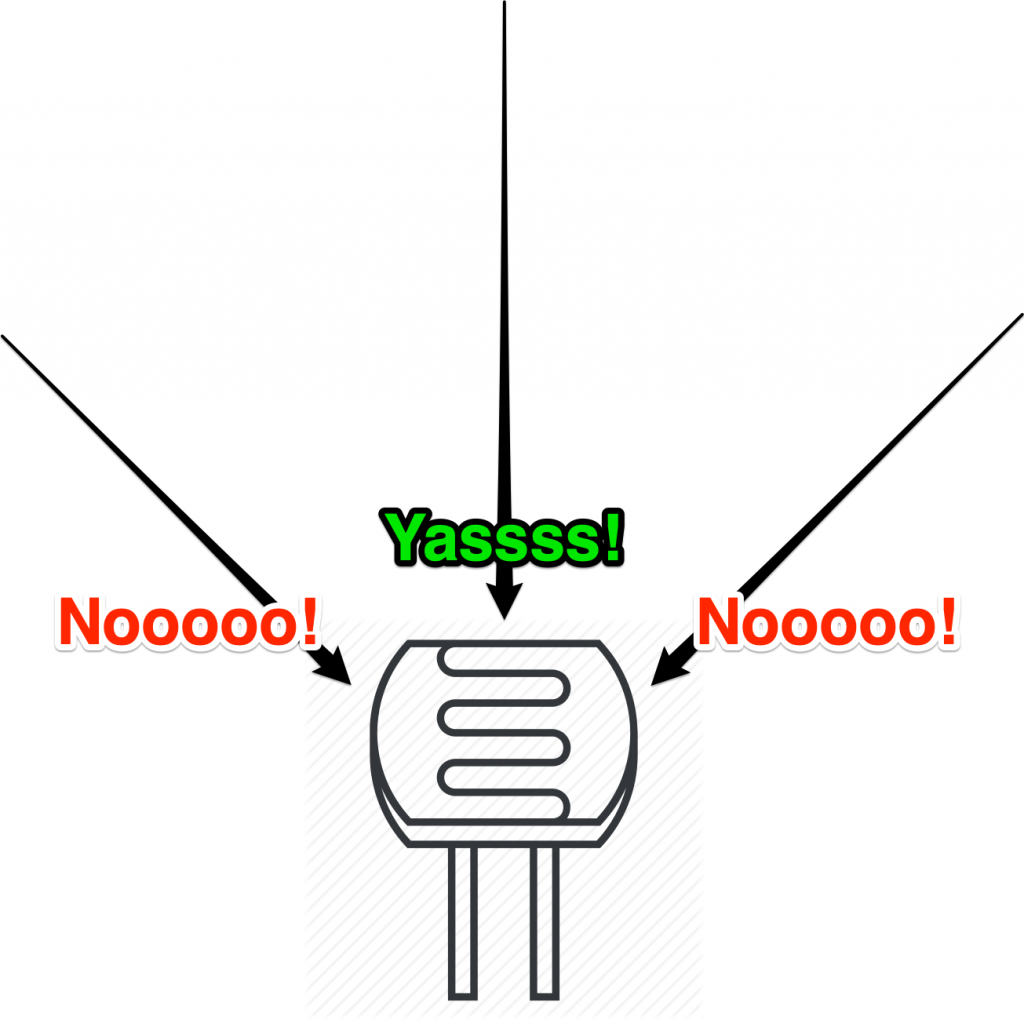
<p>While I had been playing around with the idea for some time now, with some free time on my hands, I finally got around to materialise this contraption. Let&#8217;s break this down to simpler modules; this could be divided into five clearly defined modules. The microcontroller had these responsibilities: reading the light intensity value, controlling the servo, transferring the information via Bluetooth. The PC had to do these: read the data over Bluetooth, render the scanned image. For <em>photo_resistor</em> to work there&#8217;s one last thing that needs to be taken care of: the way the light falls onto the photoresistor.</p>


<div class="wp-block-media-text alignwide is-stacked-on-mobile"><figure class="wp-block-media-text__media"><img decoding="async" loading="lazy" width="1024" height="1020" src="/wp-content/uploads/2020/03/allDirsIllus_whiteBack-1024x1020.png" alt="" class="wp-image-369 size-full" srcset="/wp-content/uploads/2020/03/allDirsIllus_whiteBack-1024x1020.png 1024w, /wp-content/uploads/2020/03/allDirsIllus_whiteBack-150x150.png 150w, /wp-content/uploads/2020/03/allDirsIllus_whiteBack-300x300.png 300w, /wp-content/uploads/2020/03/allDirsIllus_whiteBack-768x765.png 768w, /wp-content/uploads/2020/03/allDirsIllus_whiteBack-1200x1195.png 1200w, /wp-content/uploads/2020/03/allDirsIllus_whiteBack.png 1305w" sizes="(max-width: 709px) 85vw, (max-width: 909px) 67vw, (max-width: 1362px) 62vw, 840px" /></figure><div class="wp-block-media-text__content">
<p>By default, the light rays fall from all directions onto the photoresistor. This will end up polluting our readings and make the final captured image a blurry mess.</p>
</div></div>


<div class="wp-block-media-text alignwide has-media-on-the-right is-stacked-on-mobile"><div class="wp-block-media-text__content">
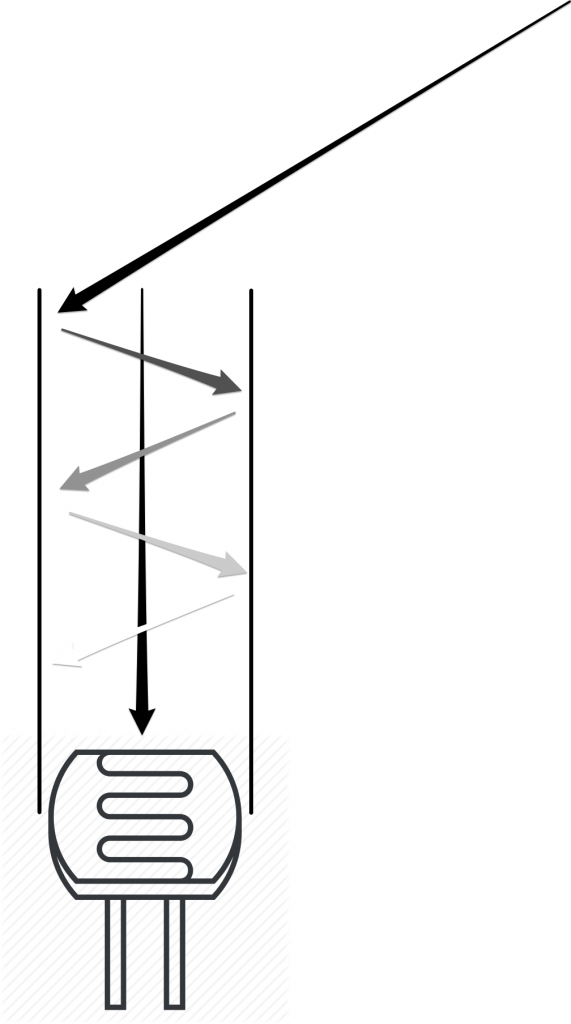
<p>So, we encase the photoresistor with a cylindrical pipe with <em>non-reflective</em> interiors walls. The pipe will act like a <em>reverse-laser</em>, making sure that the light rays falling straight onto the photoresistor at ~90° angles hits it directly and the other rays reflect off the almost-non-reflective walls multiple times and die down in amplitude by the time it reaches the photoresistor. The actual pipe I used was a black sheet of paper rolled into a cylinder.</p>
</div><figure class="wp-block-media-text__media"><img decoding="async" loading="lazy" width="571" height="1024" src="/wp-content/uploads/2020/03/uniDirIllus_whiteBack-571x1024.png" alt="" class="wp-image-370 size-full" srcset="/wp-content/uploads/2020/03/uniDirIllus_whiteBack-571x1024.png 571w, /wp-content/uploads/2020/03/uniDirIllus_whiteBack-167x300.png 167w, /wp-content/uploads/2020/03/uniDirIllus_whiteBack-768x1378.png 768w, /wp-content/uploads/2020/03/uniDirIllus_whiteBack.png 1008w" sizes="(max-width: 571px) 85vw, 571px" /></figure></div>


<p>I got down to building each module individually and started putting them together like a car would get assembled on an assembly line. Everything fit in smoothly, servos would move on command, HC-05 would send the data as requested, the python script would receive the data just fine and render the received data. Perfect! I couldn&#8217;t have asked for more.</p>


<div class="wp-block-image">
<figure class="aligncenter is-resized"><img decoding="async" loading="lazy" src="/wp-content/uploads/2020/03/so_good.png" alt="" class="wp-image-351" width="124" height="118"/></figure></div>


<p>So, conceptually, if I turn the ignition key of my contraption on, it should just work, right? Wrong. The reality is a bitch, innit? While all of my LEGO-like modules were fitting in LEGO-like gloves, it dawned on me that <em>hobbyist</em> servos with <em>hobbyist</em> photoresistors present us with <em>first-rate</em> challenges! I realised that the photoresistor readings had considerable noise and laughable sensitivity. While this did not really come to me as a surprise, what did catch me off-guard though was that the servo had an offset of up to 10° between the time when the armature is moving up vs. the time it is moving down. This resulted in images that looked like how some of the <a href="https://en.wikipedia.org/wiki/Interlaced_video#/media/File:Interlaced_video_frame_(car_wheel).jpg">old movies would look if they had the Interlacing Problem</a>.</p>


<div class="wp-block-image">
<figure class="aligncenter"><img decoding="async" loading="lazy" width="434" height="426" src="/wp-content/uploads/2020/03/interlacingIssue.png" alt="" class="wp-image-376" srcset="/wp-content/uploads/2020/03/interlacingIssue.png 434w, /wp-content/uploads/2020/03/interlacingIssue-300x294.png 300w" sizes="(max-width: 434px) 85vw, 434px" /><figcaption class="wp-element-caption"><em>photo_resistor</em>&#8216;s rendition of <em>A Starry Night</em><br>or<br>How the shitty servos screwed up my photo</figcaption></figure></div>


<p>I spent over a day figuring out what had gone wrong before finally concluding that this is an act of god over which I have no jurisdiction. So I turned to the golden answer any Indian would resort to in times of dire necessity, <em>Jugaad</em>. I just added an offset in my code to handle my servos&#8217; atrocity. All in all, it worked out just fine as you can see in the second video above and I lived happily ever after.</p>


<hr class="wp-block-separator has-css-opacity"/>


<p>You can find <a href="https://github.com/harshaxnim/photo_resistor">all of my code here</a>. </p>]]></content><author><name>Harsha Reddy</name></author><category term="diy" /><summary type="html"><![CDATA[A Mono-Pixel Camera]]></summary></entry><entry><title type="html">Dance For Me!</title><link href="https://inspirho.com/cg/dance-for-me/" rel="alternate" type="text/html" title="Dance For Me!" /><published>2016-12-21T14:05:22+00:00</published><updated>2016-12-21T14:05:22+00:00</updated><id>https://inspirho.com/cg/dance-for-me</id><content type="html" xml:base="https://inspirho.com/cg/dance-for-me/"><![CDATA[<p>Giving life is obviously the best feeling there is. This is probably why mothers want to be mothers! Well, if you can&#8217;t afford to be a mother, like me, fret not, computer graphics can take you a long way. (I am not endorsing computer graphics over motherhood. Don&#8217;t sue me mothers!)</p>
<p>I am going to give a very brief introduction to building a physics engine that can power a ragdoll.. and henceforth, power your emotions! 😉 You can go ahead and make a game&#8230; or a dame (if you know what I mean&#8230; I mean nothing, you pervert)!</p>
<p>If you&#8217;ve ever thought that building a physics engine would be so cool when you were playing those physics based games, but again, thought that the implementation could be daunting, let me assure you that it is a very simple task (ahem.. watch out for my over-simplifications. No&#8230; Just kidding, it&#8217;s actually pretty simple). You&#8217;ll probably have a harder time to set the OpenGL environment up than to build <em>this</em> physics engine. You can find this part of setting up OpenGL in a lot of places on the internet. In fact, you can even find a few articles about building a custom physics engine as well. But I&#8217;ll go ahead and write my article and try to do a better job at <em>introducing</em> physics based graphics with OpenGL.</p>
<p>Let me start with the (not so) boring theory. You should know a little of Newtonian Physics to get a context of what this is about, in which case these equations should be familiar:</p>
<p style="text-align: center;">s<sub>n</sub> = s<sub>p</sub> + v<sub>p</sub>t + (at<sup>2</sup>)/2</p>
<p style="text-align: center;">v<sub>n</sub> = v<sub>p</sub> + at</p>
<p>We will use these equations to power our engine. We discretize these equations by bringing in the <em>Δt</em> terms. <em>Velocity Verlet</em> integrators plug in the Δt directly into these equations. On the other hand, with a little bit of rearrangement, we can use the regular <i>Verlet integration:</i></p>
<p style="text-align: center;">x<sub>n</sub> = 2x<sub>c</sub> &#8211; x<sub>p</sub> + a Δt<sup>2</sup></p>
<p>n, c and p correspond to new, current and previous respectively.</p>
<p>Verlet integration is very popular. This could be because this equation saves us from the exponentially increasing t<sup>2</sup> term which occurs in the former set of equations, which will potentially introduce errors as time increases. Also, this equation turns out to be better for the general implementation because s<sub>c</sub> and s<sub>p</sub> can be just swapped. Where as, in the former case, new positions and velocities must be calculated separately. This separate calculation of velocity can also introduce instability in the system.</p>
<p>Here are the things that you need to be ready with:</p>
<ul>
<li>A simple OpenGL (of course you can use any graphics library) program that plots points in 2D</li>
<li>Zeal</li>
</ul>
<p>This is just a proof of concept, so we’ll do away with 2D. Note that extending this to 3D must be easier than a cake walk. Let’s build that physics engine in <i>tiny</i> steps.</p>
<h6 style="text-align: center;">The Gravity</h6>
<p>I’m assuming you have an array, vector or an equivalent to track the fucking points. Now let’s implement a part of the fucking equation to drive the fucking points down to earth. The fucking points need to learn the fucking lesson, don&#8217;t they? To do this, of course, we can implement only the acceleration part of the fucking equation:</p>
<p style="text-align: center;">x<sub>n</sub> += a Δt<sup>2</sup></p>
<p>Where “<i>a”</i> can be <i>–10</i> or whatever the fuck you want. We’d see something like this:</p>
<p><a href="/wp-content/uploads/2016/12/onlyGravity.gif"><img decoding="async" loading="lazy" class="aligncenter size-full wp-image-250" src="/wp-content/uploads/2016/12/onlyGravity.gif" alt="onlyGravity" width="508" height="532" /></a></p>
<p>Of course, we can have any fucking number of force vectors, which can then be added to find the effective fucking acceleration of the fucking particles.</p>
<p><a href="/wp-content/uploads/2016/12/newForce.gif"><img decoding="async" loading="lazy" class="aligncenter size-full wp-image-252" src="/wp-content/uploads/2016/12/newForce.gif" alt="newForce" width="508" height="532" /></a></p>
<p>All this swearing must be enough to apprise you of the fucking  <i>gravity</i> of the situation!</p>
<h6 style="text-align: center;">A Trajectory</h6>
<p>With the remaining part of the equation, we can give initial velocity of the particle. This will allow us to model a trajectory with initial velocity vector as the control parameter. Something of this sorts:</p>
<p><a href="/wp-content/uploads/2016/12/trajectory.gif"><img decoding="async" loading="lazy" class="aligncenter size-full wp-image-254" src="/wp-content/uploads/2016/12/trajectory.gif" alt="trajectory" width="508" height="532" /></a></p>
<p style="text-align: center;">x<sub>n</sub> = 2x<sub>c</sub> &#8211; x<sub>p</sub> + a Δt<sup>2</sup></p>
<p>If, x<sub>p</sub> was (0,0), x<sub>c</sub> could&#8217;ve been (1,1) to get an initial angle of 45º. You get the idea.</p>
<h4 style="text-align: center;">Constraints</h4>
<p>What we saw until now was finding the next step of a particle in a seemingly infinite universe without any limitations. They were just a set of points that were influenced by the forces that we modelled as if nothing else was there that influenced the movement. But this is not really the case in real life. There are a lot of interactive forces that act between infinite number of points. So, to model something like this, let&#8217;s put constraints into our existing engine. Of course, we&#8217;ll limit ourselves to a minimalistic set of points that are enough to make our animation look convincing enough. The flow of our program would be like this:</p><!-- Crayon Syntax Highlighter v_2.7.2_beta -->

		<div id="crayon-6ae43c50ed52f643448630" class="crayon-syntax crayon-theme-x3info-copy crayon-font-droid-sans-mono crayon-os-pc print-yes notranslate" data-settings=" minimize scroll-mouseover" style=" margin-top: 20px; margin-bottom: 20px; font-size: 12px !important; line-height: 22px !important;">
		
			<div class="crayon-plain-wrap"></div>
			<div class="crayon-main" style="">
				<table class="crayon-table">
					<tr class="crayon-row">
				<td class="crayon-nums " data-settings="show">
					<div class="crayon-nums-content" style="font-size: 12px !important; line-height: 22px !important;"><div class="crayon-num" data-line="crayon-6ae43c50ed52f643448630-1">1</div><div class="crayon-num" data-line="crayon-6ae43c50ed52f643448630-2">2</div><div class="crayon-num" data-line="crayon-6ae43c50ed52f643448630-3">3</div><div class="crayon-num" data-line="crayon-6ae43c50ed52f643448630-4">4</div></div>
				</td>
						<td class="crayon-code"><div class="crayon-pre" style="font-size: 12px !important; line-height: 22px !important; -moz-tab-size:4; -o-tab-size:4; -webkit-tab-size:4; tab-size:4;"><div class="crayon-line" id="crayon-6ae43c50ed52f643448630-1"><span class="crayon-t">void</span><span class="crayon-h"> </span><span class="crayon-e">generateFrame</span><span class="crayon-sy">(</span><span class="crayon-sy">)</span><span class="crayon-sy">{</span></div><div class="crayon-line" id="crayon-6ae43c50ed52f643448630-2"><span class="crayon-h">&nbsp;&nbsp;&nbsp;&nbsp;</span><span class="crayon-e">verletStep</span><span class="crayon-sy">(</span><span class="crayon-sy">)</span><span class="crayon-sy">;</span></div><div class="crayon-line" id="crayon-6ae43c50ed52f643448630-3"><span class="crayon-h">&nbsp;&nbsp;&nbsp;&nbsp;</span><span class="crayon-e">satisfyConstraints</span><span class="crayon-sy">(</span><span class="crayon-sy">)</span><span class="crayon-sy">;</span></div><div class="crayon-line" id="crayon-6ae43c50ed52f643448630-4"><span class="crayon-sy">}</span></div></div></td>
					</tr>
				</table>
			</div>
		</div>
<!-- [Format Time: 0.0012 seconds] -->
<p>Yet again, let&#8217;s build the constraint system in small steps:</p>
<h6 style="text-align: center;">The Bounding Box</h6>
<p>This is the simplest constraint to implement. Just check if the particle has moved beyond the box and limit it to the box.</p><!-- Crayon Syntax Highlighter v_2.7.2_beta -->

		<div id="crayon-6ae43c50ed53b027323806" class="crayon-syntax crayon-theme-x3info-copy crayon-font-droid-sans-mono crayon-os-pc print-yes notranslate" data-settings=" minimize scroll-mouseover" style=" margin-top: 20px; margin-bottom: 20px; font-size: 12px !important; line-height: 22px !important;">
		
			<div class="crayon-plain-wrap"></div>
			<div class="crayon-main" style="">
				<table class="crayon-table">
					<tr class="crayon-row">
				<td class="crayon-nums " data-settings="show">
					<div class="crayon-nums-content" style="font-size: 12px !important; line-height: 22px !important;"><div class="crayon-num" data-line="crayon-6ae43c50ed53b027323806-1">1</div><div class="crayon-num" data-line="crayon-6ae43c50ed53b027323806-2">2</div><div class="crayon-num" data-line="crayon-6ae43c50ed53b027323806-3">3</div><div class="crayon-num" data-line="crayon-6ae43c50ed53b027323806-4">4</div></div>
				</td>
						<td class="crayon-code"><div class="crayon-pre" style="font-size: 12px !important; line-height: 22px !important; -moz-tab-size:4; -o-tab-size:4; -webkit-tab-size:4; tab-size:4;"><div class="crayon-line" id="crayon-6ae43c50ed53b027323806-1"><span class="crayon-v">cVertices</span><span class="crayon-sy">[</span><span class="crayon-v">i</span><span class="crayon-sy">]</span><span class="crayon-sy">.</span><span class="crayon-v">x</span><span class="crayon-h"> </span><span class="crayon-o">=</span><span class="crayon-h"> </span><span class="crayon-sy">(</span><span class="crayon-v">cVertices</span><span class="crayon-sy">[</span><span class="crayon-v">i</span><span class="crayon-sy">]</span><span class="crayon-sy">.</span><span class="crayon-v">x</span><span class="crayon-o">&lt;</span><span class="crayon-cn">50</span><span class="crayon-sy">)</span><span class="crayon-h"> </span><span class="crayon-sy">?</span><span class="crayon-h"> </span><span class="crayon-cn">50</span><span class="crayon-h"> </span><span class="crayon-o">:</span><span class="crayon-h"> </span><span class="crayon-v">cVertices</span><span class="crayon-sy">[</span><span class="crayon-v">i</span><span class="crayon-sy">]</span><span class="crayon-sy">.</span><span class="crayon-v">x</span><span class="crayon-sy">;</span></div><div class="crayon-line" id="crayon-6ae43c50ed53b027323806-2"><span class="crayon-v">cVertices</span><span class="crayon-sy">[</span><span class="crayon-v">i</span><span class="crayon-sy">]</span><span class="crayon-sy">.</span><span class="crayon-v">x</span><span class="crayon-h"> </span><span class="crayon-o">=</span><span class="crayon-h"> </span><span class="crayon-sy">(</span><span class="crayon-v">cVertices</span><span class="crayon-sy">[</span><span class="crayon-v">i</span><span class="crayon-sy">]</span><span class="crayon-sy">.</span><span class="crayon-v">x</span><span class="crayon-o">&gt;</span><span class="crayon-cn">450</span><span class="crayon-sy">)</span><span class="crayon-h"> </span><span class="crayon-sy">?</span><span class="crayon-h"> </span><span class="crayon-cn">450</span><span class="crayon-h"> </span><span class="crayon-o">:</span><span class="crayon-h"> </span><span class="crayon-v">cVertices</span><span class="crayon-sy">[</span><span class="crayon-v">i</span><span class="crayon-sy">]</span><span class="crayon-sy">.</span><span class="crayon-v">x</span><span class="crayon-sy">;</span></div><div class="crayon-line" id="crayon-6ae43c50ed53b027323806-3"><span class="crayon-v">cVertices</span><span class="crayon-sy">[</span><span class="crayon-v">i</span><span class="crayon-sy">]</span><span class="crayon-sy">.</span><span class="crayon-v">y</span><span class="crayon-h"> </span><span class="crayon-o">=</span><span class="crayon-h"> </span><span class="crayon-sy">(</span><span class="crayon-v">cVertices</span><span class="crayon-sy">[</span><span class="crayon-v">i</span><span class="crayon-sy">]</span><span class="crayon-sy">.</span><span class="crayon-v">y</span><span class="crayon-o">&lt;</span><span class="crayon-cn">50</span><span class="crayon-sy">)</span><span class="crayon-h"> </span><span class="crayon-sy">?</span><span class="crayon-h"> </span><span class="crayon-cn">50</span><span class="crayon-h"> </span><span class="crayon-o">:</span><span class="crayon-h"> </span><span class="crayon-v">cVertices</span><span class="crayon-sy">[</span><span class="crayon-v">i</span><span class="crayon-sy">]</span><span class="crayon-sy">.</span><span class="crayon-v">y</span><span class="crayon-sy">;</span></div><div class="crayon-line" id="crayon-6ae43c50ed53b027323806-4"><span class="crayon-v">cVertices</span><span class="crayon-sy">[</span><span class="crayon-v">i</span><span class="crayon-sy">]</span><span class="crayon-sy">.</span><span class="crayon-v">y</span><span class="crayon-h"> </span><span class="crayon-o">=</span><span class="crayon-h"> </span><span class="crayon-sy">(</span><span class="crayon-v">cVertices</span><span class="crayon-sy">[</span><span class="crayon-v">i</span><span class="crayon-sy">]</span><span class="crayon-sy">.</span><span class="crayon-v">y</span><span class="crayon-o">&gt;</span><span class="crayon-cn">450</span><span class="crayon-sy">)</span><span class="crayon-h"> </span><span class="crayon-sy">?</span><span class="crayon-h"> </span><span class="crayon-cn">450</span><span class="crayon-h"> </span><span class="crayon-o">:</span><span class="crayon-h"> </span><span class="crayon-v">cVertices</span><span class="crayon-sy">[</span><span class="crayon-v">i</span><span class="crayon-sy">]</span><span class="crayon-sy">.</span><span class="crayon-v">y</span><span class="crayon-sy">;</span></div></div></td>
					</tr>
				</table>
			</div>
		</div>
<!-- [Format Time: 0.0008 seconds] -->
<p><a href="/wp-content/uploads/2016/12/boundingBox.gif"><img decoding="async" loading="lazy" class="aligncenter wp-image-256 size-full" src="/wp-content/uploads/2016/12/boundingBox.gif" alt="boundingBox" width="508" height="532" /></a></p>
<h6 style="text-align: center;">The Distance Constraint</h6>
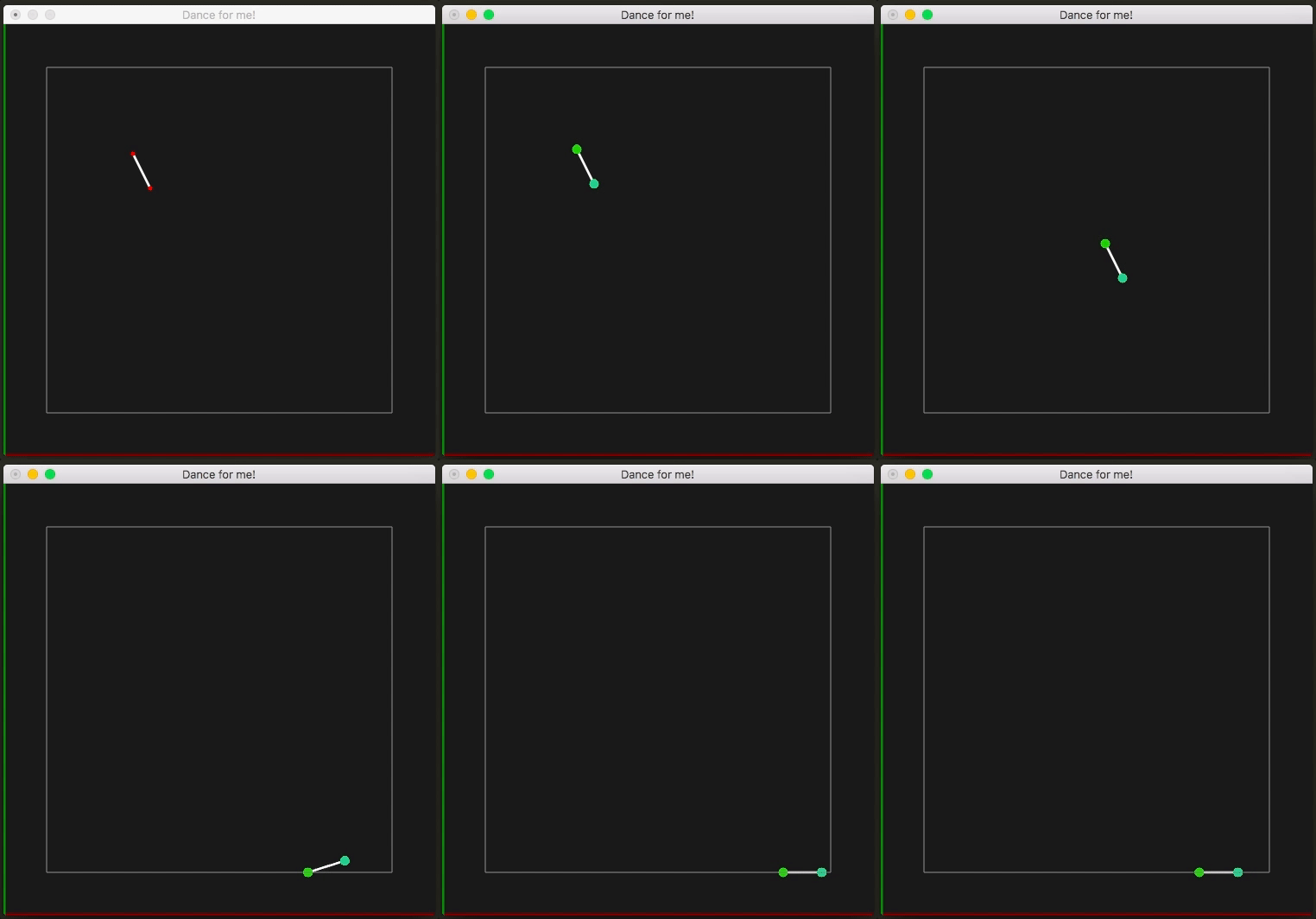
<p>This is where we&#8217;ll see things getting interesting. Adding this constraint is a huge step towards modelling our ragdoll. As the name says, this step involves fixing the distance between any two points. For the sake of convenience, let&#8217;s say the points are <em>A</em> and <em>B</em>. We put a constraint that the distance between these two points must be say, <em>d</em>. If the new distance is <em>d&#8217;</em> is different from <em>d</em>, then the delta, <em>d&#8217;–d</em> is found. Each point is pushed delta/2 away from or closer to each other based on the sign of delta. The <em>direction</em> of this push/pull is parallel to <em>A–B.</em></p><!-- Crayon Syntax Highlighter v_2.7.2_beta -->

		<div id="crayon-6ae43c50ed53f815085832" class="crayon-syntax crayon-theme-x3info-copy crayon-font-droid-sans-mono crayon-os-pc print-yes notranslate" data-settings=" minimize scroll-mouseover" style=" margin-top: 20px; margin-bottom: 20px; font-size: 12px !important; line-height: 22px !important;">
		
			<div class="crayon-plain-wrap"></div>
			<div class="crayon-main" style="">
				<table class="crayon-table">
					<tr class="crayon-row">
				<td class="crayon-nums " data-settings="show">
					<div class="crayon-nums-content" style="font-size: 12px !important; line-height: 22px !important;"><div class="crayon-num" data-line="crayon-6ae43c50ed53f815085832-1">1</div><div class="crayon-num" data-line="crayon-6ae43c50ed53f815085832-2">2</div><div class="crayon-num" data-line="crayon-6ae43c50ed53f815085832-3">3</div><div class="crayon-num" data-line="crayon-6ae43c50ed53f815085832-4">4</div><div class="crayon-num" data-line="crayon-6ae43c50ed53f815085832-5">5</div><div class="crayon-num" data-line="crayon-6ae43c50ed53f815085832-6">6</div><div class="crayon-num" data-line="crayon-6ae43c50ed53f815085832-7">7</div><div class="crayon-num" data-line="crayon-6ae43c50ed53f815085832-8">8</div><div class="crayon-num" data-line="crayon-6ae43c50ed53f815085832-9">9</div><div class="crayon-num" data-line="crayon-6ae43c50ed53f815085832-10">10</div><div class="crayon-num" data-line="crayon-6ae43c50ed53f815085832-11">11</div><div class="crayon-num" data-line="crayon-6ae43c50ed53f815085832-12">12</div><div class="crayon-num" data-line="crayon-6ae43c50ed53f815085832-13">13</div><div class="crayon-num" data-line="crayon-6ae43c50ed53f815085832-14">14</div><div class="crayon-num" data-line="crayon-6ae43c50ed53f815085832-15">15</div><div class="crayon-num" data-line="crayon-6ae43c50ed53f815085832-16">16</div><div class="crayon-num" data-line="crayon-6ae43c50ed53f815085832-17">17</div></div>
				</td>
						<td class="crayon-code"><div class="crayon-pre" style="font-size: 12px !important; line-height: 22px !important; -moz-tab-size:4; -o-tab-size:4; -webkit-tab-size:4; tab-size:4;"><div class="crayon-line" id="crayon-6ae43c50ed53f815085832-1"><span class="crayon-c">// Original Vector A-B</span></div><div class="crayon-line" id="crayon-6ae43c50ed53f815085832-2"><span class="crayon-i">Vertex</span><span class="crayon-h"> </span><span class="crayon-v">r</span><span class="crayon-h"> </span><span class="crayon-o">=</span><span class="crayon-h"> </span><span class="crayon-v">Vertex</span><span class="crayon-o">::</span><span class="crayon-e">delta</span><span class="crayon-sy">(</span><span class="crayon-v">vertices</span><span class="crayon-sy">[</span><span class="crayon-v">a</span><span class="crayon-sy">]</span><span class="crayon-sy">,</span><span class="crayon-h"> </span><span class="crayon-v">vertices</span><span class="crayon-sy">[</span><span class="crayon-v">b</span><span class="crayon-sy">]</span><span class="crayon-sy">)</span><span class="crayon-sy">;</span></div><div class="crayon-line" id="crayon-6ae43c50ed53f815085832-3">&nbsp;</div><div class="crayon-line" id="crayon-6ae43c50ed53f815085832-4"><span class="crayon-c">// Vector A'-B', A' and B' are current positions of A and B</span></div><div class="crayon-line" id="crayon-6ae43c50ed53f815085832-5"><span class="crayon-i">Vertex</span><span class="crayon-h"> </span><span class="crayon-v">d</span><span class="crayon-h"> </span><span class="crayon-o">=</span><span class="crayon-h"> </span><span class="crayon-v">Vertex</span><span class="crayon-o">::</span><span class="crayon-e">delta</span><span class="crayon-sy">(</span><span class="crayon-v">cVertices</span><span class="crayon-sy">[</span><span class="crayon-v">a</span><span class="crayon-sy">]</span><span class="crayon-sy">,</span><span class="crayon-h"> </span><span class="crayon-v">cVertices</span><span class="crayon-sy">[</span><span class="crayon-v">b</span><span class="crayon-sy">]</span><span class="crayon-sy">)</span><span class="crayon-sy">;</span></div><div class="crayon-line" id="crayon-6ae43c50ed53f815085832-6">&nbsp;</div><div class="crayon-line" id="crayon-6ae43c50ed53f815085832-7"><span class="crayon-c">// Finding the scalar distance to push/pull by</span></div><div class="crayon-line" id="crayon-6ae43c50ed53f815085832-8"><span class="crayon-t">double</span><span class="crayon-h"> </span><span class="crayon-v">dp</span><span class="crayon-h"> </span><span class="crayon-o">=</span><span class="crayon-h"> </span><span class="crayon-v">Vertex</span><span class="crayon-o">::</span><span class="crayon-e">dot</span><span class="crayon-sy">(</span><span class="crayon-v">d</span><span class="crayon-sy">,</span><span class="crayon-h"> </span><span class="crayon-v">d</span><span class="crayon-sy">)</span><span class="crayon-sy">;</span></div><div class="crayon-line" id="crayon-6ae43c50ed53f815085832-9"><span class="crayon-t">double</span><span class="crayon-h"> </span><span class="crayon-v">rl</span><span class="crayon-h"> </span><span class="crayon-o">=</span><span class="crayon-h"> </span><span class="crayon-v">Vertex</span><span class="crayon-o">::</span><span class="crayon-e">dot</span><span class="crayon-sy">(</span><span class="crayon-v">r</span><span class="crayon-sy">,</span><span class="crayon-h"> </span><span class="crayon-v">r</span><span class="crayon-sy">)</span><span class="crayon-sy">;</span></div><div class="crayon-line" id="crayon-6ae43c50ed53f815085832-10"><span class="crayon-t">double</span><span class="crayon-h"> </span><span class="crayon-v">sc</span><span class="crayon-h"> </span><span class="crayon-o">=</span><span class="crayon-h"> </span><span class="crayon-sy">(</span><span class="crayon-sy">(</span><span class="crayon-v">rl</span><span class="crayon-sy">)</span><span class="crayon-o">/</span><span class="crayon-sy">(</span><span class="crayon-v">dp</span><span class="crayon-o">+</span><span class="crayon-v">rl</span><span class="crayon-sy">)</span><span class="crayon-sy">)</span><span class="crayon-o">-</span><span class="crayon-cn">0.5</span><span class="crayon-sy">;</span></div><div class="crayon-line" id="crayon-6ae43c50ed53f815085832-11">&nbsp;</div><div class="crayon-line" id="crayon-6ae43c50ed53f815085832-12"><span class="crayon-c">// Associate that scalar to vector 'd'</span></div><div class="crayon-line" id="crayon-6ae43c50ed53f815085832-13"><span class="crayon-v">d</span><span class="crayon-sy">.</span><span class="crayon-e">scale</span><span class="crayon-sy">(</span><span class="crayon-v">sc</span><span class="crayon-sy">)</span><span class="crayon-sy">;</span></div><div class="crayon-line" id="crayon-6ae43c50ed53f815085832-14">&nbsp;</div><div class="crayon-line" id="crayon-6ae43c50ed53f815085832-15"><span class="crayon-c">// Push the current positions, thus satisfying the distance constraint</span></div><div class="crayon-line" id="crayon-6ae43c50ed53f815085832-16"><span class="crayon-v">cVertices</span><span class="crayon-sy">[</span><span class="crayon-v">a</span><span class="crayon-sy">]</span><span class="crayon-sy">.</span><span class="crayon-e">minus</span><span class="crayon-sy">(</span><span class="crayon-v">d</span><span class="crayon-sy">)</span><span class="crayon-sy">;</span></div><div class="crayon-line" id="crayon-6ae43c50ed53f815085832-17"><span class="crayon-v">cVertices</span><span class="crayon-sy">[</span><span class="crayon-v">b</span><span class="crayon-sy">]</span><span class="crayon-sy">.</span><span class="crayon-e">plus</span><span class="crayon-sy">(</span><span class="crayon-v">d</span><span class="crayon-sy">)</span><span class="crayon-sy">;</span></div></div></td>
					</tr>
				</table>
			</div>
		</div>
<!-- [Format Time: 0.0008 seconds] -->
<p>Do keep in mind that this constraint is added to the existing set of constraints, <em>The Bounding Box</em> constraint. We see something like this:</p>
<p><a href="/wp-content/uploads/2016/12/stick.gif"><img decoding="async" loading="lazy" class="aligncenter size-full wp-image-257" src="/wp-content/uploads/2016/12/stick.gif" alt="" width="508" height="532" /></a></p>
<h4 style="text-align: center;">Grand Finalè</h4>
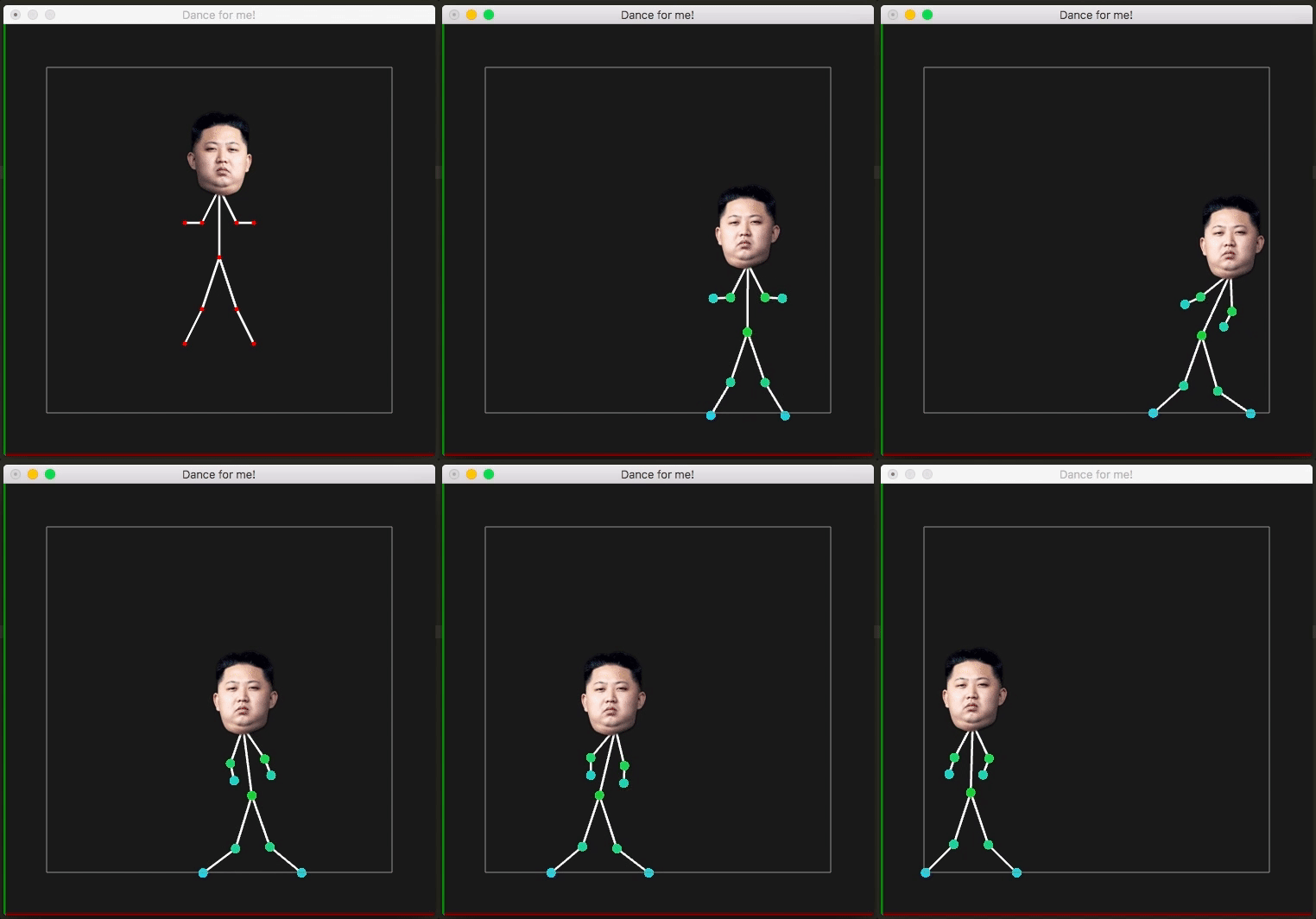
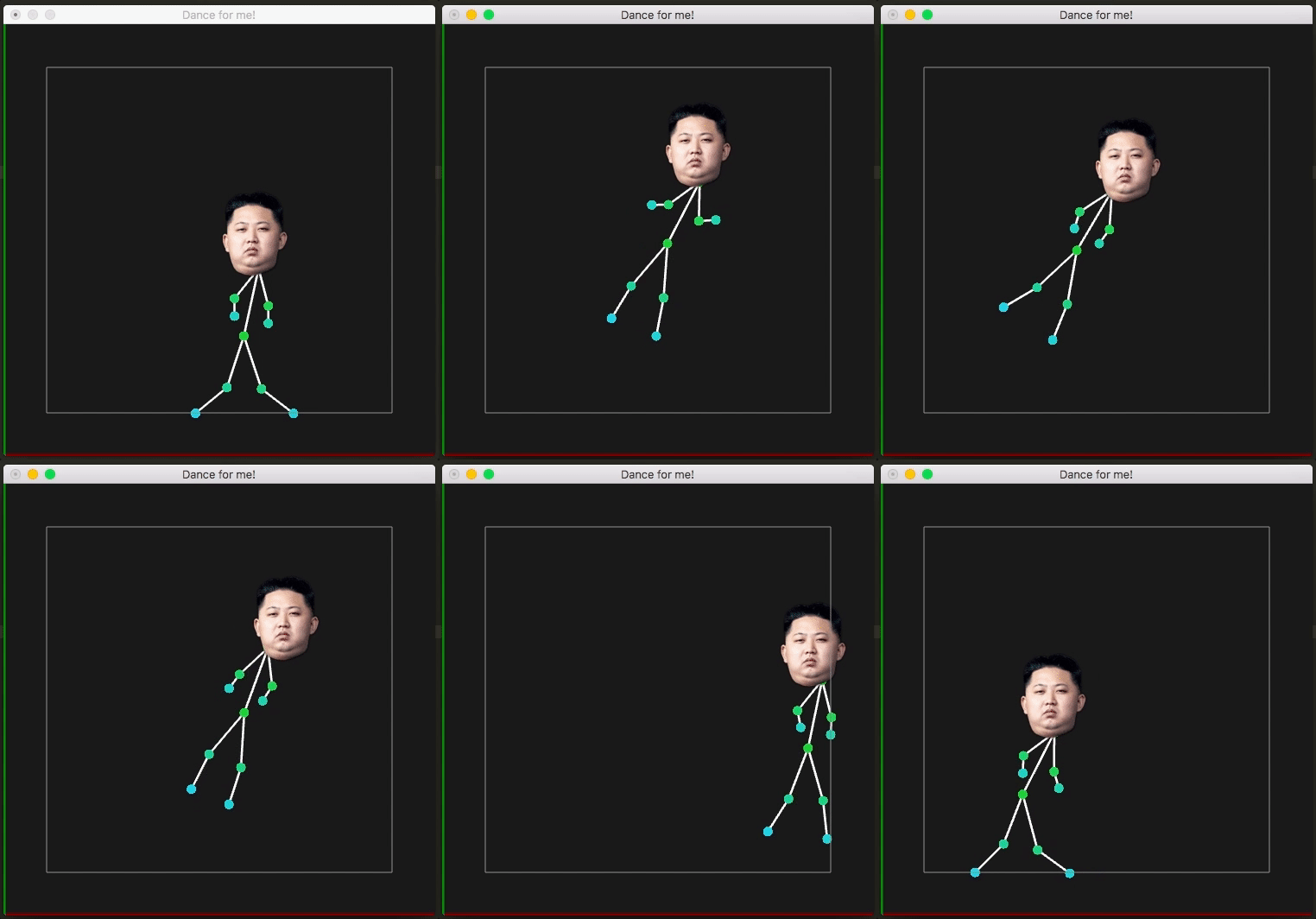
<p>Believe it or not (no, just believe it), what we&#8217;ve built until now, is enough to model a stick figure. So let&#8217;s build it and fool around with it! ?</p>
<p>Go ahead and make a simple stick figure with dimensions that please you. Put the distance constraints to keep it from collapsing into a singleton, and save yourself from the embarrassment of being called like a simpleton. Also, keep in mind that you&#8217;ll need a few distance constraints where you don&#8217;t really wanna draw a stick. You&#8217;ll hopefully understand it better from the GIF below.</p>
<p><a href="/wp-content/uploads/2016/12/finale.gif"><img decoding="async" loading="lazy" class="aligncenter size-full wp-image-258" src="/wp-content/uploads/2016/12/finale.gif" alt="finale" width="508" height="532" /></a></p>
<h4 style="text-align: center;">Appendix</h4>
<p>You can of course explore other kinds of constraints, or structures of the constraints. There&#8217;s a lot of exploratory opportunity (&#8230;not that kind!), and there are a lot of things can be implemented just with the knowledge that we&#8217;ve gained here.</p>
<p>For instance, to implement dragging of the model, we can add a new constraint on some point. The constrain here would be that the point position is equal to the mouse co-ordinate. The other constraints ensure that the model moves with that one point that we&#8217;re moving.</p>
<p><a href="/wp-content/uploads/2016/12/drag.gif"><img decoding="async" loading="lazy" class="aligncenter size-full wp-image-262" src="/wp-content/uploads/2016/12/drag.gif" alt="" width="508" height="532" /></a></p>
<p>And this can also do a manageable job at simulating cloth. Just set the vertices and constraints accordingly to generate a cloth and sim away!</p>
<p><a href="/wp-content/uploads/2016/12/cloth.gif"><img decoding="async" loading="lazy" class="aligncenter wp-image-263 size-full" src="/wp-content/uploads/2016/12/cloth.gif" alt="cloth" width="508" height="526" /></a></p>
<p>This write-up and my implementation is inspired from the classic paper <strong>Advanced Character Physics</strong> written by <em>Thomas Jakobsen</em>.</p>
<p><em>Pat yourself, because you can be proud that you&#8217;ve just learnt something that was used in one of the best franchise games of the current world!</em> Yes, this was used in a <em>2001</em> game, <strong>Hitman: Codename 47</strong>, for the first time in the gaming industry.</p>
<p>And now, time for a small pep talk&#8230; What we learnt now is just a tool. Remember, all the knowledge in the world is just that, a tool. The greatness lies upon the one who can make the best of them. I know, we&#8217;re all tired of people quoting random stuff and associating it with Einstein, but trust me on this one, I&#8217;ve got this from a reliable source: “<em>Imagination is more important than knowledge. For knowledge is limited to all we now know and understand, while imagination embraces the entire world, and all there ever will be to know and understand.</em>”</p>
<p>Believe yourself to be an artist and you are one. And do <em>not</em> hesitate to take up unconventionalities.</p>
<p>“<em>I am an artist you know&#8230; it is my right to be odd.</em>”<br />
― <a class="authorOrTitle" href="https://www.goodreads.com/author/show/2798990.E_A_Bucchianeri">E A Bucchianeri</a>, <span id="quote_book_link_11418420"><a class="authorOrTitle" href="https://www.goodreads.com/work/quotes/16351434">Brushstrokes of a Gadfly</a></span></p>]]></content><author><name>Harsha Reddy</name></author><category term="cg" /><summary type="html"><![CDATA[Simple Ragdoll Physics]]></summary></entry><entry><title type="html">A Rant on the Government e-mails!!</title><link href="https://inspirho.com/uncategorized/a-rant-on-the-government-e-mails/" rel="alternate" type="text/html" title="A Rant on the Government e-mails!!" /><published>2016-08-31T18:26:00+00:00</published><updated>2016-08-31T18:26:00+00:00</updated><id>https://inspirho.com/uncategorized/a-rant-on-the-government-e-mails</id><content type="html" xml:base="https://inspirho.com/uncategorized/a-rant-on-the-government-e-mails/"><![CDATA[<div dir="ltr" style="text-align: left;">I was going through some of my files and I came across this write-up that I had written as a part of the course, <i>History of Graphics Design</i> in Coursera. It seems [surprisingly] well written and was also lauded by my evaluators. I thought it was worth sharing! To set a context, I had to write about how the trends of advertising strategies have changed over time and I had to pick a case-study to analyse as well.</div>
<div dir="ltr" style="text-align: left;"></div>
<div dir="ltr" style="text-align: left;"><img decoding="async" loading="lazy" class="wp-image-147 size-medium alignright" src="/wp-content/uploads/2016/08/ttc2l-apjs8-172x300.jpg" alt="ttc2l-apjs8" width="172" height="300" srcset="/wp-content/uploads/2016/08/ttc2l-apjs8-172x300.jpg 172w, /wp-content/uploads/2016/08/ttc2l-apjs8-768x1337.jpg 768w, /wp-content/uploads/2016/08/ttc2l-apjs8-588x1024.jpg 588w, /wp-content/uploads/2016/08/ttc2l-apjs8.jpg 1024w" sizes="(max-width: 172px) 85vw, 172px" /></div>
<div dir="ltr" style="text-align: left;">So, I chose this e-mail from the current Government of India. It was quite interesting to see that the current government has chosen to continue using technology, and not just limit themselves to during the elections. This is how a typical mail from the government looks like. You do not need to actually see what&#8217;s written to drive my point home. Just notice the amount of writing, and the placement of the graphic elements in the mail.</div>
<div dir="ltr" style="text-align: left;"></div>
<div dir="ltr" style="text-align: left;">
<p>&nbsp;</p>
<p>The following is me quoting myself:</p>
<div><i>The product that I&#8217;ve chosen is an e-mail advertisement from the Government of India. The National Informatics Center (NIC) has created the email. The email serves as an information brochure to the citizens of the nation. It&#8217;s very convenient to track the government&#8217;s progress and get the updates on the new schemes that the government proposes. This is never seen before in India and is very unlike the previous governments that were in power. From a different perspective, it serves as an advertisement to the current government. By the time, the next elections take place, they would have already spread their word and would have a stronger foothold on the population. </i></div>
<div><i> </i></div>
<div><i>We see a lot of national programs starting off in the country, and email is a very cheap mass communication means. This is obviously one strategy, the strategy of mass communicating. But what I want to talk about is an outdated strategy that they have adopted in their emails. If you have a look at the recent mail (attached), it feels very unprofessional. It is also  inconvenient to go through the mail with so much written around. The programs are defined and it’s functionality is over-elaborated, all cramped in one place. True that this email is to spread awareness about the national programs. We know awareness programs are taken up when the information spread has not happened efficiently. But how much awareness can you spread if the awareness program itself is inefficient?! An analogy can be drawn directly to the last video &#8220;Words doing the work&#8221;. Advertisers used to follow this strategy, but later the trend that followed, as we can see was that of a minimalistic style.</i></div>
<div><i> </i></div>
<div><i>One probable reason they have used this strategy is because they do not have so much to sell, as to offer us  information. Although it is an advertisement of sorts, they can afford to not adopt conventional strategies because they already have our attention. We want to know what the government has to offer because we are paying our taxes and we need to read the benefits now. This is certainly different from the case where, say someone is trying to sell me a phone. They do not have my money yet, so they need to lure me in. They make it as easy as possible for me to buy their phone.</i></div>
<div><i> </i></div>
<div><i>Another possibility is that because the Govt. of India is trying to provide us information and not sell something off to us, and also because the strategies are unimportant to heed to they don&#8217;t have to invest much on advertisements. Such poor budgets in advertisements would only allow them to hire poor ad-designers.</i></div>
<div><i> </i></div>
<div><i>On the closing note, since they do not have much incentive to better it (unlike advertisers), I believe it’ll be a long time before we see a more conveniently readable informational emails/posters.</i></div>
<div></div>
</div>]]></content><author><name>Harsha Reddy</name></author><category term="Uncategorized" /><summary type="html"><![CDATA[I was going through some of my files and I came across this write-up that I had written as a part of the course, History of Graphics Design in Coursera. It seems [surprisingly] well written and was also lauded by my evaluators. I thought it was worth sharing! To set a context, I had to write about…]]></summary></entry><entry><title type="html">Help Yourself, Help Others</title><link href="https://inspirho.com/joblessness/help-yourself-help-others/" rel="alternate" type="text/html" title="Help Yourself, Help Others" /><published>2016-03-27T20:19:00+00:00</published><updated>2016-03-27T20:19:00+00:00</updated><id>https://inspirho.com/joblessness/help-yourself-help-others</id><content type="html" xml:base="https://inspirho.com/joblessness/help-yourself-help-others/"><![CDATA[<p class="p1"><span class="s1">Gürbüz Doğan Ekşioğlu is a Turkish artist/cartoonist. One of his paintings got my attention.</span></p>
<p class="p1"><span class="s1"><a href="/wp-content/uploads/2016/03/BiTMEYEN-oYKu-Gurbuz-Dogan-Eksioglundan-Yeni-Bir-Sergi-13-1.jpeg"><img decoding="async" loading="lazy" class="wp-image-82 size-full aligncenter" src="/wp-content/uploads/2016/03/BiTMEYEN-oYKu-Gurbuz-Dogan-Eksioglundan-Yeni-Bir-Sergi-13-1.jpeg" alt="bitmeyen-oyku-gurbuz-dogan-eksioglundan-yeni-bir-sergi-13" width="600" height="459" srcset="/wp-content/uploads/2016/03/BiTMEYEN-oYKu-Gurbuz-Dogan-Eksioglundan-Yeni-Bir-Sergi-13-1.jpeg 600w, /wp-content/uploads/2016/03/BiTMEYEN-oYKu-Gurbuz-Dogan-Eksioglundan-Yeni-Bir-Sergi-13-1-300x230.jpeg 300w" sizes="(max-width: 709px) 85vw, (max-width: 909px) 67vw, (max-width: 984px) 61vw, (max-width: 1362px) 45vw, 600px" /></a><br />
Most of the analyses that I&#8217;ve seen go by similar captions as, <i>“They let you think they are helping!”.</i></span></p>
<p class="p1"><span class="s1"><br />
But from what I see, the efforts of the man on top are sincere. The following discourse conveys my thoughts on the same (Narrated by the man on top):</span></p>
<p class="p1"><span class="s1"><br />
<i>I want to help my people, but am I good enough? If I&#8217;m going to help I&#8217;ve got to do my best.. So I rise higher hoping to help better.. On and on I go until I&#8217;ve reached the top.. but alas.. I guess I&#8217;ve travelled a little too far.. and no more can I reach the very people I wanted to help.. </i></span></p>
<p class="p1"><span class="s1"><i><br />
</i>Shows how a person with all the good intentions will not be able to achieve what he wants to because of the miscalculation of the goal. The goal here was to help the man in the trench. But the person outside [with all the good intentions!] raised to the top thinking that he could help better.</span></p>
<p class="p1"><span class="s1"><br />
This also reflects how people want develop and hence let go of their roots to grow further in life.. but after a time they can hardly recognise their own roots. They&#8217;re just too far. It&#8217;s too sad if you can relate to it.</span></p>
<p class="p1"><span class="s1">As a remedy, people should always keep in mind where they want to go in their lives. It&#8217;s a common practice to set sub-goals to achieve the bigger ones, but one should not be engrossed in over-achieving them. It&#8217;s the main goal that matters and it&#8217;s the main goal that always mattered. In this case, if the man outside wanted to help the man from the better position, he should&#8217;ve realised that going higher might not actually get him closer to his goal. Ignorance is not innocence and hence cannot be accepted as a reason to over-shoot. He should have checked every once in a while about what he wants. In other words, one should re-discover oneself once in a while whenever one feels lost. Not as easy as saying I realise, but one should always strive. On an entirely different note, one shouldn&#8217;t give up because perfection is impossible to achieve, but must strive towards it. Perfection is like infinity. One can only do a lim(<i>x-&gt;∞), </i>limit x tending to infinity. [For those who wants to take a bite at it, I know we can have systems where perfection is possible. Finding the square root of 4? 2. Perfect. No better solution than that! LOL]</span></p>
<p class="p1"><span class="s1"><br />
When we&#8217;re talking about re-discovering our life goals, an analogy strikes me of the <i>agile software development (we may not limit to software alone actually. You should read about it sometime if you haven&#8217;t already)</i>. The other models of software development usually involves taking the requirements and delivering the solution by the end of the term. But agile development involves checking and rechecking what is required and refining the path to the goal. This makes sure that the developers are not in an assumption that they&#8217;re on the right track and neither would the customer. This would save a bitter surprise for both the parties. Like the surprise of both the parties in this painting. <i>A bitter surprise.</i></span></p>]]></content><author><name>Harsha Reddy</name></author><category term="Joblessness" /><category term="Reviews" /><category term="Ideas" /><summary type="html"><![CDATA[Gürbüz Doğan Ekşioğlu is a Turkish artist/cartoonist. One of his paintings got my attention. Most of the analyses that I’ve seen go by similar captions as, “They let you think they are helping!”. But from what I see, the efforts of the man on top are sincere. The following discourse conveys my thoughts on the same (Narrated by…]]></summary></entry><entry><title type="html">Music Videos in Slow Motion? What’s the big deal?!</title><link href="https://inspirho.com/uncategorized/music-videos-in-slow-motion-whats-the-big-deal/" rel="alternate" type="text/html" title="Music Videos in Slow Motion? What’s the big deal?!" /><published>2016-03-08T20:24:00+00:00</published><updated>2016-03-08T20:24:00+00:00</updated><id>https://inspirho.com/uncategorized/music-videos-in-slow-motion-whats-the-big-deal</id><content type="html" xml:base="https://inspirho.com/uncategorized/music-videos-in-slow-motion-whats-the-big-deal/"><![CDATA[<div dir="ltr" style="text-align: left;"><b>(A random) Observation:</b><br />Did you realise that to sync the singer&#8217;s lips in a slow motion music video (Take&nbsp;<a href="https://www.youtube.com/watch?v=YykjpeuMNEk" target="_blank">Hymn for the Weekend</a>&nbsp;by Coldplay for instance)&nbsp;is not so trivial.</p>
<p>During the shooting, the song has to played in faster than actuality to assist the singer in lip sync!</p>
<p><b>Elaboration:</b><br />In other words, if one wants to make a slow motion video for a song, the audio must be at the same tempo, but the video is on a different &#8220;<i>tempo</i>&#8220;. This must be compensated! So, if I want the song video to be going at a rate of 0.75x, while shooting, the singer has to sing the same song at 1/0.75x or 1.33x.</p>
<p>Similar idea goes to music videos where the video is played faster than the song (<a href="https://www.google.co.in/search?client=safari&amp;rls=en&amp;q=friday+rebecca+black&amp;ie=UTF-8&amp;oe=UTF-8&amp;gfe_rd=cr&amp;ei=jS3fVprQDqjT8geUhZ74Bw" target="_blank">Friday</a> by Rebecca Black&#8230; er&#8230; rofl&#8230; no? haha). No hate please. She&#8217;s already had a hard time making the video probably!</div>]]></content><author><name>Harsha Reddy</name></author><category term="Uncategorized" /><category term="Ideas" /><category term="notes" /><summary type="html"><![CDATA[(A random) Observation:Did you realise that to sync the singer’s lips in a slow motion music video (Take Hymn for the Weekend by Coldplay for instance) is not so trivial. During the shooting, the song has to played in faster than actuality to assist the singer in lip sync! Elaboration:In other words, if one wants to make a…]]></summary></entry><entry><title type="html">Life is Rain</title><link href="https://inspirho.com/uncategorized/life-is-rain/" rel="alternate" type="text/html" title="Life is Rain" /><published>2015-05-16T10:06:00+00:00</published><updated>2015-05-16T10:06:00+00:00</updated><id>https://inspirho.com/uncategorized/life-is-rain</id><content type="html" xml:base="https://inspirho.com/uncategorized/life-is-rain/"><![CDATA[<div dir="ltr" style="text-align: left;">It was ought to be an occupied weekend. But you know how the brain works. The worst kinds of distractions occur when you&#8217;re supposed to be focused on the task at hand!</p>
<div></div>
<div>So I was &#8220;preparing&#8221; to start the research on what I was supposed to know for the summer internship program. &#8220;Preparing&#8221; I was for over 10 hours. Every little [irrelevant] thing seemed <i>interesting</i> (and in my defence, they were all interesting)! With me goofing around for way too long came the afternoon. It was dark. The weather!  The weather was dark and was quiet!</div>
<div></div>
<div>It was very calm and peaceful, just the right amalgamation to trigger the nature admirer in you! And soon it started pouring. It was a little windy too. I went to the balcony to admire the rain (an admirer that I had now become!). Then I saw the tiny droplets. They were spherical, like a pearl, unlike the other heavier droplets. They were tiny, but not puny. The life of a raindrop is to reach the earth from the skies. The heavy raindrops are focused. They reach home, the earth the fastest, but what about all the grandeur, all the magnificence that they have missed as they journey from the heavens to the mother earth? Sure they might be a whole lot faster than the tiny pearly droplets, but how good is that really?</div>
<div></div>
<div>Life is like that. The lighter (and simpler) the life is, more freedom you feel. I know I might sound a little trippy but, you stumble upon new ideas only when you let yourself free. Only when you can take your time out to look around and admire what lays in front of you, to explore what is hidden from you, and to question what is beyond you. Only when you drive yourself towards the destination without missing out the journey. Only when you be that <i>little carefree droplet</i>.</div>
<div></div>
<div>FLY, EXPLORE, DEBATE. <i>LIVE</i>.</p>
<p>P.S.: Too much of this would just be <i>goofing</i> around and I&#8217;ve realised that it&#8217;s not all that desirable! Oh and if you&#8217;re wondering on why does it rain like it does, <a href="http://www.geography-site.co.uk/pages/physical/climate/why%20does%20it%20rain.html" target="_blank" rel="nofollow">this here</a> might be a good place to start!</div>
</div>]]></content><author><name>Harsha Reddy</name></author><category term="Uncategorized" /><category term="Poetry" /><summary type="html"><![CDATA[It was ought to be an occupied weekend. But you know how the brain works. The worst kinds of distractions occur when you’re supposed to be focused on the task at hand! So I was “preparing” to start the research on what I was supposed to know for the summer internship program. “Preparing” I was…]]></summary></entry><entry><title type="html">Steer II UPDATES</title><link href="https://inspirho.com/uncategorized/steer-ii-updates/" rel="alternate" type="text/html" title="Steer II UPDATES" /><published>2014-03-03T21:07:00+00:00</published><updated>2014-03-03T21:07:00+00:00</updated><id>https://inspirho.com/uncategorized/steer-ii-updates</id><content type="html" xml:base="https://inspirho.com/uncategorized/steer-ii-updates/"><![CDATA[<div dir="ltr" style="text-align: left;"><span style="color: #e69138;"><a href="/uncategorized/steer-ii/" target="_blank">Read the first post/context here</a></span><br /><span style="color: #e69138;">UPDATE 1.2</span><br /><span style="color: #999999;">And this one&#8217;s amazing!</span><br /><span style="color: #999999;">Let the video do the talking!.. 😀</span></p>
<div style="clear: both; text-align: center;"><iframe width="560" height="315" src="https://www.youtube-nocookie.com/embed/kVIl-HLSFcU" title="YouTube video" frameborder="0" allowfullscreen loading="lazy"></iframe></div>
<p><span style="color: #999999;"><br /></span><span style="color: #999999;"><a href="http://youtu.be/kVIl-HLSFcU" rel="nofollow" target="_blank">Video</a></span><br /><span style="color: #999999;"><br /></span><span style="color: #999999;">You can customize what really happens at such events though. May be even <i>add</i> a few&nbsp;peculiar&nbsp;events (like when shut like a book!?!&#8230; No?.. okay!&#8230; :D)</span><br /><span style="color: #e69138;"><br /></span><span style="color: #e69138;"><br /></span><span style="color: #e69138;">UPDATE 1.1</span><br /><span style="color: #999999;">Finally came up with something (with the accelerometer!..)</span><br /><span style="color: #999999;">Using it to shift workspaces on Ubuntu! 😀</span><br /><span style="color: #999999;">A little annoying as of now, but&#8230; not being a pessimist, with a <i>lot</i> of changes and a <i>lot</i> of testing, it should be good to go!!..</span><br /><span style="color: #999999;">=]</span><br /><span style="color: #999999;">Here&#8217;s a small demonstration of what it is as of now! 🙂</span><br /><span style="color: #999999;"><br /></span></p>
<div style="clear: both; text-align: center;"></div>
<div style="clear: both; text-align: center;"><iframe width="560" height="315" src="https://www.youtube-nocookie.com/embed/AsvrYxEi0RY" title="YouTube video" frameborder="0" allowfullscreen loading="lazy"></iframe>&nbsp;</div>
<div style="clear: both; text-align: center;"><a href="https://www.youtube.com/watch?v=AsvrYxEi0RY" target="_blank">Video</a></div>
<p></div>]]></content><author><name>Harsha Reddy</name></author><category term="Uncategorized" /><summary type="html"><![CDATA[Read the first post/context hereUPDATE 1.2And this one’s amazing!Let the video do the talking!.. 😀 VideoYou can customize what really happens at such events though. May be even add a few peculiar events (like when shut like a book!?!… No?.. okay!… :D)UPDATE 1.1Finally came up with something (with the accelerometer!..)Using it to shift workspaces on Ubuntu! 😀A…]]></summary></entry></feed>